
A WordPress website adapted to a company's processes It's not just about displaying services, products, or content. It can become an operational interface for capturing requests, validating data, coordinating approvals, retrieving information from other systems, and triggering tasks across departments. The key isn't installing a lot of plugins; it's translating a real-world process into maintainable rules, assigning responsibilities, statuses, and integrations.
Table of Contents
- What Does Adapting WordPress to a Business Process Mean?
- How to Convert a Process into an Executable Workflow
- Architecture, Integrations, and Master Data Source
- Implementation, Security and Maintenance
- Frequently Asked Questions
What Does Adapting WordPress to a Business Process Mean?
Customizing WordPress means configuring or developing the CMS to reflect how an organization works. Instead of a form simply sending an email, you can create a statused request, assign it to an owner, request approval, and record the outcome in a CRM, ERP, or billing system.
I don't recommend starting with the tool itself. First, it's important to define what happens before, during, and after each action. A customer onboarding process, for example, might involve marketing, sales, administration, and customer service. If WordPress only collects the form data, but the team copies data into three different applications, the website adds a layer of manual work instead of reducing it.
WordPress As Frontend, Orchestrator, Or Core System
WordPress can take on different roles. Choosing one avoids unrealistic expectations and technical decisions that are difficult to reverse.
| WordPress Paper | When Does It Make Sense | Primary Risk |
|---|---|---|
| Interface | When the company needs forms, a private area, a catalog, or a portal for customers and employees | Relying on manual processes if there is no real integration |
| Orchestrator | When you need to start tasks and connect CRM, ERP, billing, calendars, or marketing platforms | Creating fragile workflows if integrations don't handle failures |
| Central System | When the process is relatively simple and the data does not require a specialized system | Converting the CMS into a makeshift ERP |
My reasoning is simple: WordPress works well as an interface and user experience layer. It can also coordinate specific operations using APIs and webhooks. However, if the business manages complex accounting, high-frequency inventory, production, payroll, or regulated processes, it's usually wiser for the specialized system to retain primary control.
This doesn't diminish the value of WordPress. On the contrary, it allows each platform to do what it's designed for. The website can offer a clear user experience while the ERP manages orders, inventory, and invoices; the CRM maintains contacts and opportunities; and WordPress presents the appropriate status without duplicating critical logic.
What Processes Can It Cover
The possibilities depend on the complexity, permissions, and systems already in place. Common examples include the following:
• Business requests that create or update opportunities in the CRM.
• Budget forms that apply validations, territorial allocations, and internal approvals.
• Private areas where customers can check orders, documents, reservations or incidents.
• Editorial processes with draft, review, approval and publication date.
• WooCommerce stores connected with inventory, logistics, billing and after-sales communications.
• Internal requests for purchases, permits, payments or staff recruitment.
Gravity Flow documents form-based workflows with assignments, approvals, rejections, rollbacks, and conditional logic within WordPressThese capabilities are especially well-suited when an application needs to go through several people before being completed.
For content and public presence, the process must also remain consistent with business objectives. The relationship between experience, visibility, and lead generation is explained in more detail in this resource on web design and online marketing.
A digital process is not defined by its screens. It is defined by who can do what, with what data, in what order, and what happens when something goes wrong.
How to Convert a Process into an Executable Workflow
Before choosing a theme, form plugin, or automation, I recommend mapping out the process as it currently happens, not as it should theoretically happen. If an exception is handled by phone, email, or a spreadsheet, that should be included in the initial map.
The Operational Map Before Development
An executable workflow needs more detail than a diagram with arrows. For each process, it's advisable to document these elements:
- Entrance: what initiates the case, such as a form, order, reservation, document, or change of status.
- Required information: which fields are needed and how are they validated?
- Initial responsible party: which team or role receives the task.
- States: for example, received, under review, pending customer, approved, rejected, and closed.
- Rules: conditions that change the route, such as amount, country, type of product or level of risk.
- Exceptions: What happens if data is missing, integration fails, or a person doesn't respond?
- Exit: what records are created, what notifications are sent, and where is the evidence stored?
Let's consider a quote request. If the amount is below a certain threshold, it could be automatically assigned to sales. If it exceeds that threshold, it might require sales approval. If the customer requests special terms, the system should flag the case for human review, rather than trying to resolve it with an overly rigid rule.
Deterministic automation is useful for repeatable decisions: validating a postal code, assigning a salesperson to a region, or sending a reminder after a defined period. However, contract negotiations, price exceptions, or decisions involving financial risk should retain a point of human review.
Sitetrail proposes separating automated rules from exceptions that require human intervention, and coordinating systems through APIs, webhooks, and structured data.It's a practical distinction: automating repeatable tasks does not eliminate professional judgment.
Plugins, Configuration, or Custom Development
The choice shouldn't be ideological. A plugin reduces implementation time when the process truly aligns with its capabilities. Custom development is reasonable when the company needs its own logic, specific controls, or an integration that doesn't reliably exist.
| Option | It is advisable to choose it when | Should Be Avoided When |
|---|---|---|
| Standard Plugin | The workflow is common, well-documented, and has active support. | It forces changes to essential business rules |
| Configuring multiple plugins | The tools have compatible integrations and the workflow is moderate. | Dependencies, opaque connectors, or data conflicts accumulate |
| Custom plugin | There are specific and stable rules, permissions, or integrations. | The requirement still changes every week. |
| Complete custom development | The process is strategic, complex, or requires a very specific UX. | The goal is to solve a simple need already met by a well-established solution. |
I don't recommend writing custom code for every detail. But it's also not advisable to force a critical process into a plugin that doesn't allow you to audit changes, export data, or control permissions. The initial cost is only part of the decision; licenses, updates, testing, support, and future replacement also matter.
As a reference for editorial workflows, Wordflow allows you to configure stages, responsible parties, and dates for the publishing cycle in WordPressThis type of solution may be sufficient for coordinating content, although it does not replace an operations platform when more advanced controls are required.
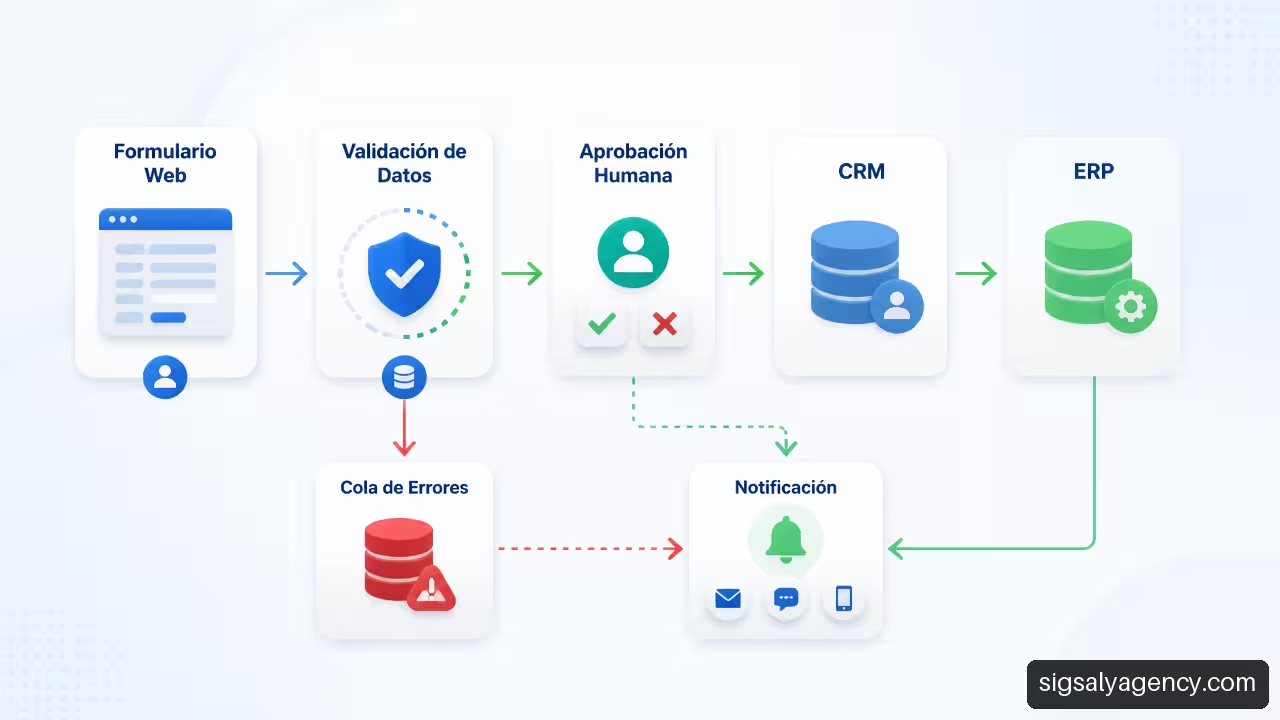
Architecture, Integrations, and Master Data Source
A useful integration isn't simply about "connecting" applications. You need to decide which system has control over each piece of data. If WordPress, the CRM, and the ERP can edit the same phone number, the same order, or the same product without a clear rule, conflicts will arise.
Define the Master Source of Each Data Point
The master source It is the system authorized to retain the primary value of a piece of data. WordPress can display it, request changes, or store a temporary copy, but it should not compete with the system that has the final authority.
| Fact | Usual Master Source | Possible Role of WordPress |
|---|---|---|
| Business contact | CRM | Capture leads and showcase private area |
| Order and invoicing | ERP or billing platform | Check status and gather necessary data |
| Stock and availability | ERP or inventory system | Show updated availability in catalog |
| Corporate content | WordPress | Create, review, publish, and distribute content |
| Web preferences | WordPress or consent platform | Manage allowed forms and preferences |
For example, a WooCommerce store might receive an order, but the ERP system might be the master source for availability and invoicing. In that case, WordPress shouldn't automatically update the final stock levels if the ERP system is handling reservations, returns, or sales from other channels.
Seahawk Media describes enterprise WordPress projects with APIs, third-party services, and security, performance, and scalability requirements.This combination explains why the architecture must be analyzed before building the interface.
APIs, Webhooks and Partial Failures
REST APIs allow you to request or send information between systems. GraphQL can be useful when the external system exposes this option and the interface needs to query specific datasets. Webhooks, on the other hand, notify you of an event, such as a paid order or an updated opportunity, without waiting for a periodic query.
The critical point arises when an operation fails midway. Imagine WordPress creates an order in the ERP, but the response is lost before the operation is confirmed. If it's retried without oversight, a duplicate order could be created.
To reduce that risk, I recommend incorporating these measures:
• Unique transaction identifier: Each shipment must include a key that allows us to recognize if it has already been processed.
• Idempotence: Repeating the same request should not create a second record or charge twice.
• Event Log: Each attempt must record date, origin, response, and status.
• Fault queue: Incomplete executions should be visible for review or controlled retry.
• Operational alerts: A team needs to know if a critical synchronization stops working.
The workflow plugins available on WordPress.com showcase capabilities such as triggers, webhooks, retries, and failed execution queues for automations in WordPress and WooCommerce.It is not enough to simply activate these functions: it is necessary to define who reviews the errors and how long a case can remain unresolved.
Implementation, Security and Maintenance
A solid project typically progresses in phases. Trying to automate all processes at once multiplies dependencies and makes it difficult to pinpoint which part failed. My recommendation is to start with a frequent, measurable process with reasonably stable rules.
A Gradual and Verifiable Implementation
- Audit the current process: Identify data, responsible parties, tools, manual steps, and exceptions.
- Define the minimum scope: Choose a flow that provides value without requiring a complete transformation from day one.
- Modeling data and permissions: Create fields, roles, states, and validations before designing final screens.
- Build and integrate: configure plugins or develop the necessary logic and connections.
- Test normal cases and borderline cases: including duplicates, unauthorized users, incomplete data, slow APIs, and partial failures.
- Publish with monitoring: Review records, errors, response times, and pending tasks.
- Optimize with data: Adjust rules based on actual results, not just on the team's perception.
Accessibility, performance, and interface clarity are not optional extras. If a person cannot find the status of a request or does not understand what data to enter, automation generates problems. This strategic guide for professional web design It helps to place accessibility and performance within digital planning.
Permits, Traceability and Recovery
In sensitive processes, it should not be possible for the same person to request, approve, and execute an operation without oversight. This separation is known as segregation of dutiesNot all processes require the same level of control, but it is advisable to apply it to payment approvals, discounts, changes to critical data, or publication of regulated information.
At a minimum, the project must include:
• Roles limited by function, not by convenience.
• Enhanced authentication for administrators and users with sensitive access.
• Record of changes in statuses, data, and approvals.
• Tested backups, not just scheduled ones.
• Updates in a test environment before applying them in production.
• Documentation of plugins, credentials, APIs, responsible parties and recovery procedure.
I also recommend preparing for an exit strategy from the outset. If a plugin is discontinued or the provider changes, the company needs to know how to export logs, replace the integration, and preserve historical data. A WordPress site connected to business processes requires ongoing maintenance: updates, compatibility testing, security monitoring, and rule reviews whenever operations change.
Indicators to Know If the Adaptation Works
There's no single figure that demonstrates the return on investment for automating a workflow. It depends on the volume, the initial data quality, and any exceptions. That's why it's advisable to measure before and after using clear operational indicators.
| Indicator | What It Helps To Detect |
|---|---|
| Average cycle time | How long does a request take from submission to completion? |
| Manual labor on a case-by-case basis | How many copying, reviewing, or tracking tasks are still necessary? |
| Error rate | Incomplete, duplicate, or incorrect forms |
| Integration failures | Operations that require retry or manual correction |
| Percentage of exceptions | Cases that do not follow the expected path |
| Fault resolution time | Operational capacity to recover incomplete processes |
Key Takeaways
• WordPress can be an effective interface and orchestrator, but it should not replace specialized systems without assessing the risk.
• The process map should include inputs, data, responsible parties, statuses, rules, exceptions, and outputs.
• The master data source prevents conflicts between WordPress, CRM, ERP, WooCommerce, and billing.
• Idempotency, logging, and failure queues are essential controls when APIs and retries exist.
• Automation must coexist with human review in commercial, financial or sensitive decisions.
• A maintainable project needs permits, traceability, testing, monitoring, and an exit plan.
Sources and References
- Gravity Flow — Business Process Automation with WordPress: https://gravityflow.io/
- Sitetrail – Custom WordPress Development & WooCommerce Automation: https://www.sitetrail.com/software-development/custom-wordpress-development-woocommerce-automation/
- WordPress.org — Wordflow: https://wordpress.org/plugins/wordflow/
- WordPress.com—Workflow Plugins: https://wordpress.com/plugins/browse/workflow
- Seahawk Media — WordPress Development for Businesses: https://seahawkmedia.com/es/soluciones/wordpress-empresarial/
Frequently Asked Questions
Can WordPress integrate with the CRM and ERP that the company already uses?
Yes, usually through APIs, webhooks, connectors, or custom development. The crucial question is not just whether a connection exists, but what data is exchanged, which system maintains the master data source, and what happens when one of the two systems becomes unresponsive. For a specific need of web development and design with WordPressIt is advisable to first review the documentation of the applications that the company already uses.
When is it enough to configure plugins and when is custom development necessary?
Plugins are sufficient when the workflow is standard and its rules align with the company's way of working. Custom development is more appropriate if there are complex permissions, custom calculations, integration without a reliable connector, or a highly specific user experience. If the process changes frequently, it may be preferable to validate a flexible configuration first before writing final code.
Can a form automatically create a customer, an opportunity, or an order?
Yes, provided the integration is designed for it. The form must validate data, prevent duplicates, and record the response from the target system. If the CRM or ERP rejects the registration, WordPress needs to report the problem and make the case available for review, not simply display a generic "submission successful" message.
Which system should store key customer and order information?
It depends on the process. Typically, a CRM stores contacts and opportunities; an ERP manages orders, inventory, and invoicing; and WordPress manages content and website interaction. The important thing is to document the decision. The same piece of information may appear in several systems, but only one should have the authority to make permanent changes.
How are duplicates avoided when an integration retries an operation?
The integration must use a unique key per operation and check if it already exists before creating a record. This property, called idempotence, allows a request to be retried without duplicating orders, contacts, or payments. Event logs and a failure queue that allows investigation into the reason for each retry are also helpful.
Is it safe to use WordPress for internal company processes?
It can be if configured with appropriate controls. This includes updates, minimal roles, strong authentication, backups, pre-testing, and action logging. For financial, personal, or regulated processes, it's advisable to assess legal requirements, data retention, and segregation of duties before deploying.
How do you measure whether automation actually saves time?
A baseline must be established before implementation: cycle time, manual interventions, errors, and cases requiring correction. These same indicators are then compared over a sufficient period. It's unwise to promise universal savings, as a workflow with many exceptions may require more revision than initially anticipated.
How can the project be migrated if the agency or plugin is changed?
The exit strategy must be planned from the outset. I request documentation of fields, rules, integrations, credentials, custom code, licenses, and export procedures. Data must be extractable in usable formats, and critical workflows must have a temporary manual procedure in case an integration becomes unavailable.