He technical SEO It's the part of SEO that prevents website problems from overshadowing good content. If a page can't be crawled, rendered, or indexed correctly, improving its text or acquiring backlinks will have a limited effect. I would approach it as a review of the infrastructure that allows search engines to discover, interpret, and display the site.
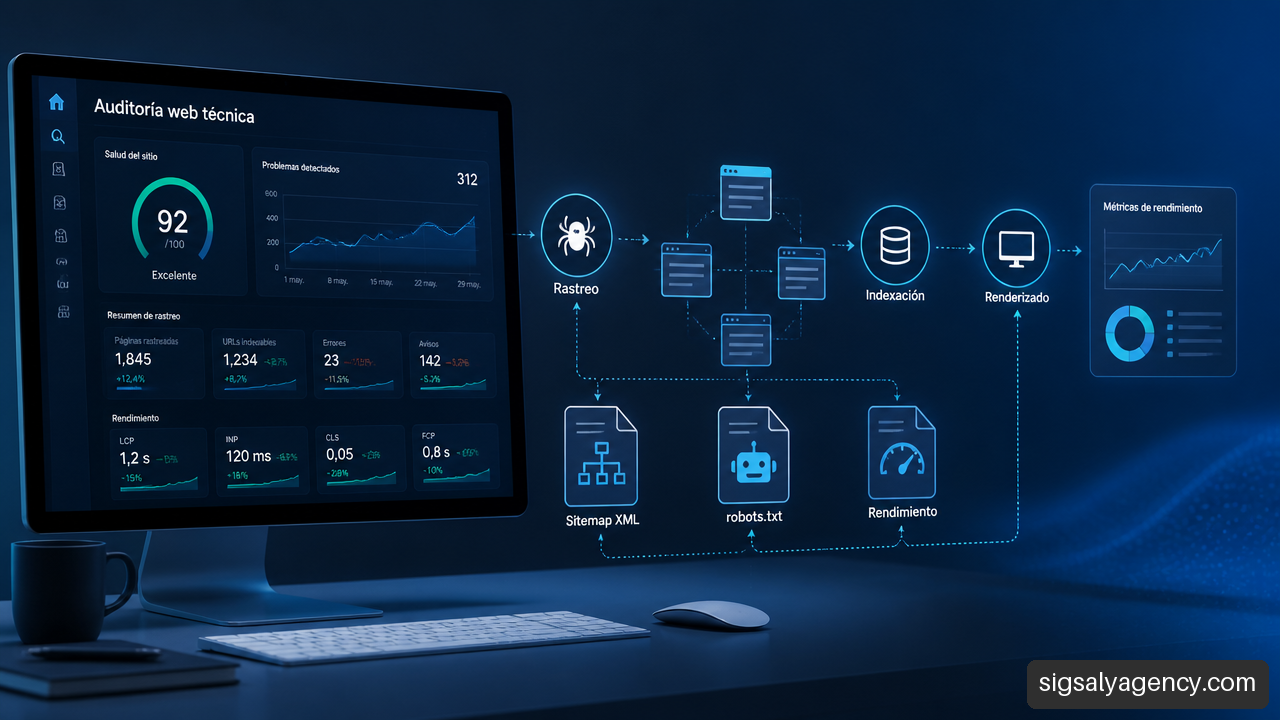
Table of Contents
• What Technical SEO Should Solve
• How to Audit and Prioritize Technical Issues
• Critical Implementations: JavaScript, Languages, and Migrations
• Frequently Asked Questions About Technical SEO
• Sources
What Technical SEO Should Solve
Technical SEO aims to ensure that a website's structure and resources allow Google to access important URLs, process their content, and decide whether they should be included in its index. It's not a collection of isolated tweaks. It's a system where architecture, servers, tags, redirects, and performance all affect each other.
The official guide to SEO techniques and strategies from Google Search Central It compiles best practices for improving crawlability, indexability, and other technical fundamentals. It's a useful reference for distinguishing between a reasonable recommendation and a rule that might directly prevent a URL from appearing in search results.
Crawling, Rendering, and Indexing Are Not the Same Thing
It is advisable to separate three phases, because each one fails for different reasons:
| Phase | What Happens | Trouble Sign | Main Action |
|---|---|---|---|
| Tracking | The robot requests a URL and its resources | The URL is not discovered or returns errors. | Review internal links, sitemap, HTTP responses, and robots.txt |
| Rendering | The necessary HTML, CSS, JavaScript, and images are processed. | The final content does not match what a user sees | Check HTML rendering and locked resources |
| Indexing | Google evaluates whether to keep the URL for search results | The URL is excluded or another canonical URL is selected | Review noindex, canonical, duplicates, and page quality |
A page can return a 200 code and still be useless for SEO. For example, a product page might load for a person, but leave the name, price, and description inside JavaScript components that aren't reliably delivered in the initial HTML or rendered correctly. The result is a URL that's available but difficult to interpret.
Google needs access to both the page and supporting resources, including CSS and images, to render and evaluate it properly. Therefore, blocking style directories or scripts in robots.txt Without analyzing the effect, you can prevent the search engine from seeing the page's true composition. I don't recommend assuming that "if the text is on the screen, Google already understands it." You have to validate it with an actual inspection.
Robots.txt, Noindex, Sitemap and Canonical: Four Distinct Functions
These elements are frequently confused, even though they solve different problems. A common mistake is to use robots.txt to try to remove pages from Google. This file guides the crawling process, but it's not equivalent to an exclusion instruction from the index. If a URL is already known through external links or other signals, blocking its crawling doesn't guarantee it will disappear from the results.
| Element | Correct Function | When to Use It | When It's Not Enough |
|---|---|---|---|
robots.txt | Directing tracker access | Routes with no traceability value, such as controlled technical areas | To remove a URL that has already been indexed |
noindex | Requesting that a page not be indexed | Filters, internal results, or low-value content | If the URL is blocked and the robot cannot read the label |
| XML Sitemap | Facilitate the discovery of relevant canonical URLs | New pages, large catalogs, and frequent updates | As a substitute for consistent internal links |
| Canonical | Indicate preferred version among similar URLs | Parameter variants, pagination, or controlled duplication | To hide clearly unnecessary pages |
The canonical tag is a signal, not a magic eraser. If a store generates /sneakers?color=black, /sneakers?order=price and other combinations, can indicate which is the main URL. However, if each variant offers a truly distinct and useful selection for the searcher, consolidating them without analysis can reduce the coverage of relevant searches.
The decision depends on the intent and the content. I would consider URLs with nearly identical information, scattered internal signals, and zero organic traffic as candidates for consolidation. Conversely, I would keep indexable those categories that respond to a specific demand and have their own navigation, inventory, and content.
Architecture, Performance, and Mobile as the Operating Base
Technical architecture distributes internal authority and helps discover pages. Key URLs should be accessible via crawlable HTML links, not just from an internal search engine, click events, or late-loading menus. On a small corporate website, this often means services, departments, cases, and resources linked from logical paths. In an e-commerce site, it requires managing facets, pagination, and orphaned categories.
Performance shouldn't be evaluated solely based on a single number. It's essential to identify which component is slowing down the perceived load: an overly large main image, blocking fonts, a third-party script, or a sluggish server response. Core Web Vitals are a practical tool for detecting friction, but they don't replace a thorough business analysis. A fast page that doesn't explain the service won't solve customer acquisition problems either.
Mobile compatibility deserves the same level of scrutiny. Relevant content, links, structured data, and directives must be present in the version the mobile user sees. Hiding essential information in that view or serving a reduced version changes what the search engine can evaluate.
On websites built with content management systems, the choice of templates, plugins, and hosting influences this point. Understanding WordPress as a CMS It helps decide which parts belong to the editor, which to the theme, and which require technical intervention to avoid creating unnecessary dependencies.
How to Audit and Prioritize Technical Issues
A useful audit doesn't begin by fixing warnings by sheer volume. It begins by separating true blocks from minor improvements. A site with thousands of unindexable URLs and a long title doesn't have a title problem: it has a discovery, policy, or consolidation problem.
The Official documentation from Google Search Central for improving SEO It centralizes resources on crawling, indexing, structured data, migrations, and other technical topics. I would use it as a basis for validating configurations, especially when a platform or extension applies automatic rules that are difficult to see from the editor.
A Diagnostic Workflow That Prevents Fixes in the Wrong Order
I propose this sequence because it protects first the ability to appear in search engines and then the ability to compete better:
- Confirm which URLs are strategic. Create a list of pages that should attract visits: services, categories, priority listings, commercial content, and necessary language versions.
- Check responses and directives. Review HTTP codes,
noindexCanonicals, redirects, and potential blocks. A priority URL with 404, 5xx, or a canonical link to another page.noindexIt is resolved before any visual improvement.
- Inspect the URL in Search Console. This tool isn't just for submitting a sitemap. It allows you to check the selected canonical URL, indexing status, crawl date, and potential reasons for exclusion. If the page is published but not appearing in the index, this step helps narrow down the possibilities.
- Compare the HTML and the rendered result. Especially with JavaScript, you need to verify that titles, links, main text, and product elements are available to the crawler.
- Analyze templates and patterns. A template error in one category can be repeated across hundreds of URLs. Correcting the pattern has a greater impact than editing pages one by one.
- Optimize performance and enrichment. Once pages are discoverable and indexable, you can work on speed, structured data, and improved presentation in results.
Rule of thumb: First, it resolves what prevents a URL from existing for Google; then, what makes it difficult to use; finally, what can enrich its presentation.
Search Console as a Diagnostic Tool
Search Console is especially valuable when the question arises: “Why isn’t this URL indexed?” Instead of concluding that Google is taking too long, it’s worth reviewing the reason shown in the inspection. The causes could point to… noindex, redirection, duplication, blocking, alternative content with canonical or server errors.
Information should be read in context. A URL not being indexed isn't always a problem. A size filter, a thank-you page, or an internal search result might not be eligible for search results. The problem arises when the exclusion affects a profitable category, a service landing page, or an essential language version.
On large sites, I would also look at which areas are being crawled and which are updated with a delay. Crawl budget tends to matter more when there are many URLs, parameters, schedules, filters, or variable inventory. If the bot is spending resources on duplicate pages, it may take longer to discover changes on the ones that really matter.
What to Check Based on Site Type
Not all priorities carry the same weight. This table helps you decide where to focus your initial work:
| Site Type | Most Common Technical Risk | Initial Priority | Recommended Decision |
|---|---|---|---|
| Ecommerce | Filters, out-of-stock products, and duplication by variants | Canonicals, facets, internal links, and sitemaps | Index only combinations with demand and useful content |
| SaaS | JavaScript content and dynamic product pages | Rendering, initial HTML, and performance | Deliver critical content without being completely dependent on the client |
| Digital Media | Extensive archive and old URLs | Architecture, paging, and efficient crawling | Facilitate the discovery of recent and relevant pieces |
| Local Business | Few pages, but high commercial value | Indexing of services, mobile and consistent data | Avoid thin pages created only to repeat locations |
| Multilingual Website | Cross-version issues and incorrect language selection | Hreflang and canonicals by language | Maintain complete correspondence between variants |
Continuous maintenance allows for regression detection: a plugin that adds noindexAn update that breaks links or a template that changes the canonical tag. That's why, Website maintenance: the invisible investment It should not be understood as a purely operational task, but as a preventive measure for organic visibility.
Critical Implementations: JavaScript, Languages, and Migrations
Some configurations appear correct until reviewed as a whole. JavaScript, hreflang, and migrations account for some of the most costly errors because they affect many URLs simultaneously.
JavaScript: Visible Content Does Not Always Mean Accessible Content
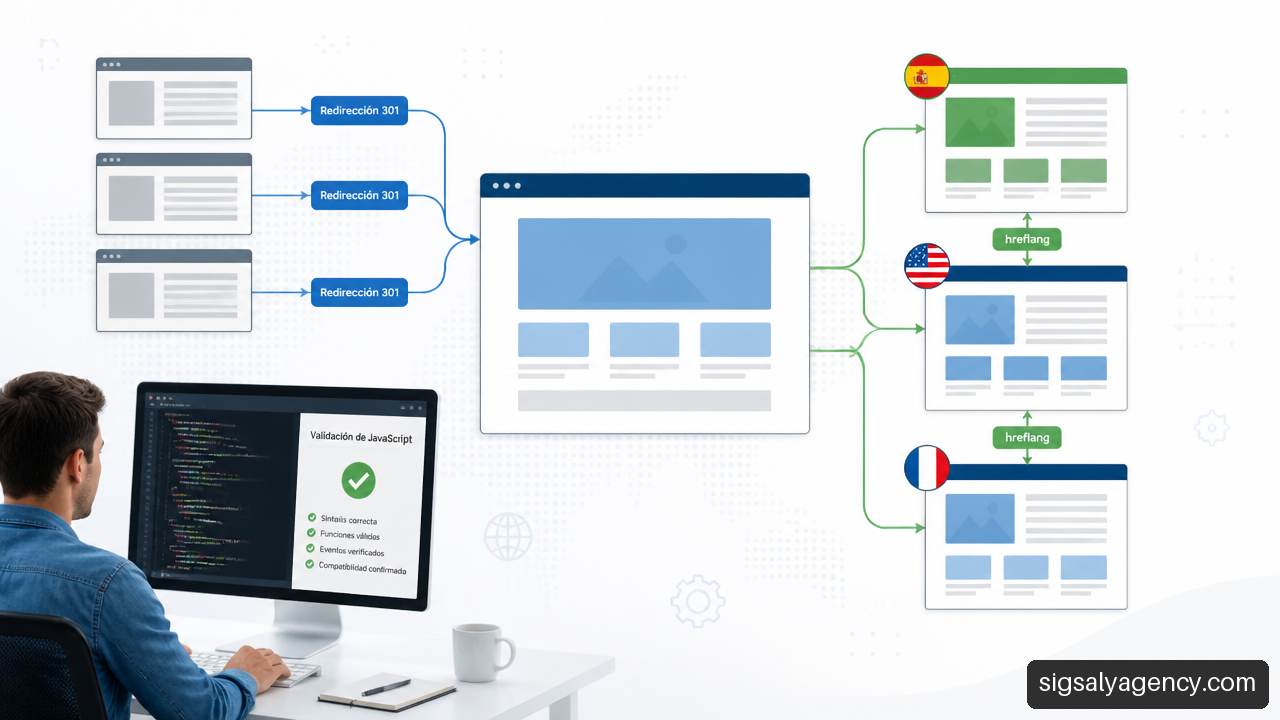
JavaScript is not incompatible with technical SEO. The problem arises when key content only exists after a complex chain of scripts, API calls, cookie consent, or user interaction. If a dependency fails, the crawler may receive a page with little text and few links, even though the final interface appears complete.
For a service page, critical elements should be accessible without special actions:
• Main title and description of the service.
• Links to related services, cases, or contact information.
• Price, availability or feature information where applicable.
• Structured data and metadata consistent with the visible content.
Common solutions include server-side rendering, pre-rendering, or a hybrid architecture. The choice depends on the product and technical capabilities. For a complex application, eliminating JavaScript may not be realistic. In that case, the goal is to reduce reliance on JavaScript for content that needs to be indexed and to check the rendered HTML after each deployment.
Unambiguous Hreflang on Multilingual Sites
hreflang It helps to indicate which URL corresponds to each language or language/region combination. It does not translate pages or replace a localized content strategy. Its function is to reduce ambiguity when equivalent alternatives exist, such as a Spanish page for Spain and another for Mexico.
A robust implementation must meet these conditions:
- Each version must include references to other equivalent versions.
- The relationship must be reciprocal: if the Spanish URL declares the French one, the French one must declare the Spanish one.
- Each page must include a self-reference, that is, it must also indicate its own version.
- The declared URLs must be absolute, indexable, and return code 200.
- The canonical tag should normally point to the same language version, not to a URL in another language.
- The label
x-defaultThis is useful when there is a general selection page or a version intended for users with no clear match.
A common mistake is translating a page but leaving its canonical slash pointing to the original language. The signals conflict: hreflang It refers to alternatives, while the canonical tag might suggest that a particular version isn't preferred for indexing. The solution isn't to add more tags, but to first define which URL should be independent and indexable in each market.
Migration: Resolution 301 Is Necessary, But It Is Not the Entire Strategy
A migration can include a domain change, redesign, HTTPS implementation, URL structure changes, CMS updates, or several simultaneous changes. The more elements modified at once, the harder it is to pinpoint the cause of a downtime. When possible, it's advisable to minimize variables and plan the transition in phases.
A 301 redirect indicates that a URL has been permanently moved. However, redirecting everything to the homepage does not preserve specific relevance. The correspondence should be as close as possible: old product to equivalent product, old article to updated article, and previous category to successor category.
Before publishing, I would prepare a redirect matrix and validate this path:
- Export relevant URLs from analytics, internal links, sitemap, and previous crawls.
- Assign a single valid destination URL to each important legacy page.
- Avoid chains like
A → B → CThe old URL should lead directly to the final destination.
- Update internal links, canonicals, hreflang, and sitemaps to point to the new URLs.
- Keep redirects in place long enough for users, links, and search engines to consolidate the change.
- Monitor tracking errors, exclusions, and impressions after launch.
A redesign can lead to a loss of traffic not because the design itself is worse, but because text, category pages, or links that previously maintained relevance have been removed. Recovery requires comparing inventory, content, HTTP responses, and canonical signals; it's not simply a matter of waiting.
Structured data concludes this section with a realistic expectation: it helps search engines understand a page's entities and properties, but it doesn't guarantee richer results or improved rankings. It must reflect visible and valid information; marking nonexistent reviews or prices that don't appear on the page creates a fragile implementation.
Key Takeaways
Prioritize the ability to be found
• Fix crawling, rendering, indexing, and redirection blocks faster than cosmetic tweaks.
• Use robots.txt to guide tracking, noindex to exclude from indexing and canonical to consolidate similar alternatives.
• Consider Search Console as a URL diagnostic tool, not just a channel for submitting sitemaps.
Turn Technical SEO into a Process
• Review the templates, because a repeated defect has more impact than an isolated error.
• Validate critical content on sites with JavaScript and after each relevant change.
• On multilingual websites, align hreflang, canonicals and indexable URLs.
• In migrations, it protects URL-to-URL equivalencies and prevents generic redirects to the homepage.
Frequently Asked Questions About Technical SEO
What exactly is technical SEO?
It is the set of technical decisions that enables search engines to discover, crawl, render, understand, and index the appropriate pages. It includes architecture, server responses, directives, performance, JavaScript, structured data, and international settings.
How do I know if Google can crawl my website correctly?
Start by inspecting priority URLs in Search Console. Then, check that they return a 200 code and are not blocked by [unclear/unclear]. robots.txtA sitemap should have internal links and its essential resources should be able to load. It aids discovery, but it doesn't fix inaccessible or poorly linked pages.
How do I check if my site is indexed correctly?
Compare your list of strategic URLs with their status in Search Console. Don't try to index everything: identify which pages provide real value and confirm that those are the ones being indexed. If Google chooses a different canonical URL or excludes one, analyze the reason before requesting a re-indexing.
When Should I Use a Canonical Tag?
Use it when multiple URLs display identical or very similar content and you want to indicate a preferred version. It's common in tracking parameters, sorting, and navigation variants. Don't use it to resolve pages that should be removed, redirected, or blocked in another way.
How does JavaScript affect technical SEO?
Access to content can be delayed or hindered if the initial HTML is empty, resources are broken, or the text only appears after interaction. The solution depends on the technology, but the content and key links should be verifiable in the result rendered by Google.
How do I configure Hreflang on a multilingual website?
Create relationships between each group of equivalent pages by language or region. Include reciprocal links, self-references, and indexable URLs with a 200 status code. Avoid pointing the canonical tag of a Spanish version to the English version, as this combination can send conflicting signals.
What Should I Check During a Website Migration to Avoid Losing Traffic?
Review the 301 redirect map, the thematic equivalence between old and new URLs, internal links, canonical tags, sitemap, hreflang, and server responses. Then, monitor Search Console for an increase in errors, excluded pages, or drops in impressions in specific areas.
Sources
• Google Search Central — SEO Techniques and Strategies: https://developers.google.com/search/docs/fundamentals/get-started?hl=es
• Google Search Central — Documentation to Improve SEO: https://developers.google.com/search/docs