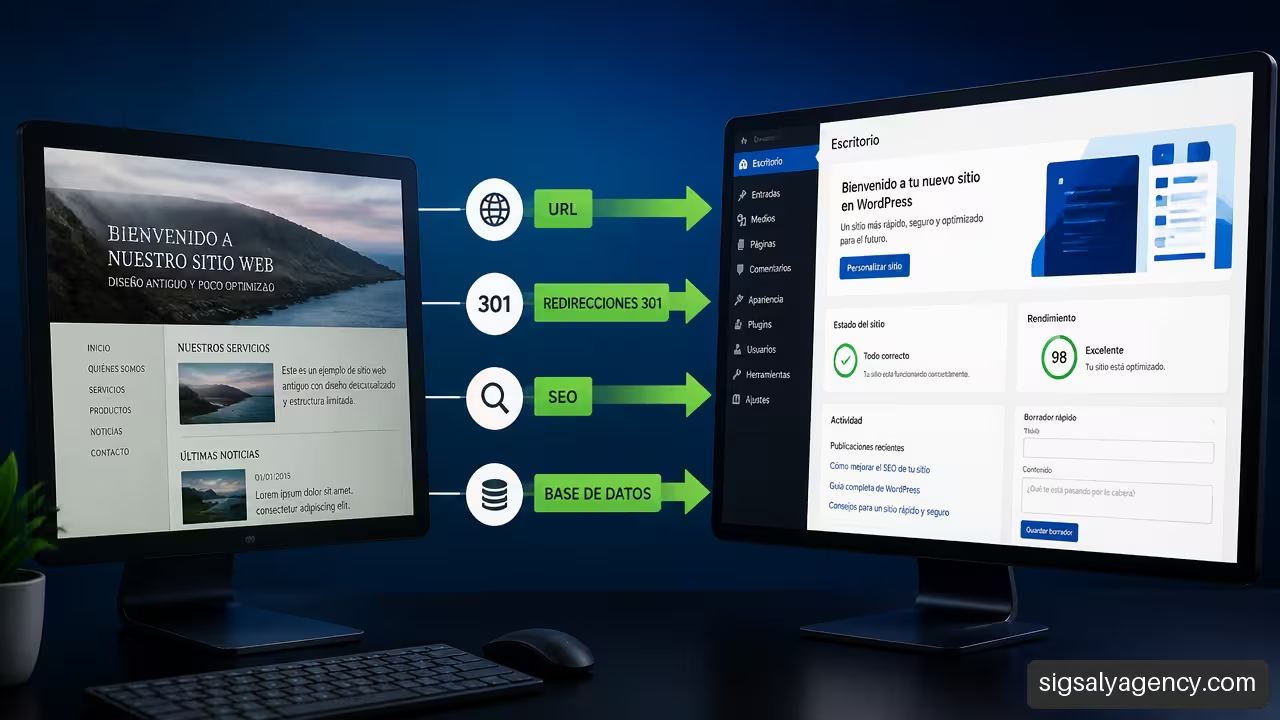
Migrating an old website to WordPress without losing search engine ranking is possible, but it doesn't happen simply by installing a new theme and copying text. A secure SEO migration preserves the signals that search engines and users already recognize: URLs, useful content, internal links, metadata, performance, and accessibility. The goal is to change the technology without breaking the relationship between each old page and its organic value.
Table of Contents
• Key Points
• Plan Your Migration Before Touching WordPress
• Build the New Website and Protect SEO Signals
• Launch, Validate, and Fix After Change
• Frequently Asked Questions
• Sources and References
Key Points
• Keep the same URLs provided the current architecture still makes sense. It's the most direct way to reduce the number of redirects required.
• Create a full backup of files, database, downloadable resources and settings before starting.
• Don't redirect everything to the homepage. Each old URL should lead to a new equivalent, related page or, if no valid alternative exists, return the appropriate code.
• Test in staging mode before changing DNS. Publishing without validating tracking, forms, canonicals, and redirects turns fixable errors into visible issues.
• Measure before and after. Without an inventory of URLs, clicks, impressions, and conversions, it will be difficult to distinguish a normal variation from a technical failure.
Plan Your Migration Before Touching WordPress
Separate the changes that will be made
The first step is deciding what's actually changing. Moving an old website to a new server is not the same as changing the CMS, redesigning all the templates, modifying the URLs, and moving the domain all at once. Each change adds a layer of risk.
A technology migration involves, for example, moving from static HTML or an outdated CMS to WordPress, while preserving the domain, content, and URL structure. In this case, the priority is to replicate the existing behavior with a more maintainable technical foundation.
In contrast, a complete migration can include changes to the architecture, text, categories, images, HTTPS, and domain. It may be necessary, but it should be treated as an SEO project and not just a simple visual refresh.
| Exchange rate | Primary Risk | Recommended Decision |
|---|---|---|
| Hosting change | Outages, DNS, or email | Maintain URLs and validate the new server before the change |
| Switching to WordPress | Loss of templates, metadata, or functions | First replicate the structure that already receives traffic |
| URL changes | 404 errors and fragmented SEO signals | Create an individual 301 redirect map |
| Redesign | Reduced content or semantic changes | Maintain search intent and content hierarchy |
| Domain change | Temporary loss of signals and links | Plan global redirects and enhanced review |
If the old website already has clear URLs, such as /services/web-design/There is no automatic advantage to converting them into /service-page-123/ or change the entire category structure. Aesthetics don't compensate for an architecture that's less understandable for users and search engines.
To delve deeper into the technical aspects of the platform, it is helpful to review how to approach the web development and design with WordPress without separating design, performance, and content structure.
Create a Backup and a Prioritized Inventory
Before moving a single file, I need a verifiable backup. It's not enough to assume the provider maintains a recent copy. The backup should include site files, database, images, PDF documents, configurations, linked emails (where applicable), and an export of available URLs.
The documentation of WordPress Developer Resources on technical migration It indicates that the process includes backing up files, exporting the database, and adapting wp-config.php to the credentials of the new environment. Even if an older website doesn't yet use WordPress, the principle is identical: preserve a recoverable version before transforming anything.
Your inventory shouldn't be a flat list of thousands of addresses. It should be sorted by value. A page with 10 clicks per month and no conversions doesn't require the same attention as a service listing that attracts backlinks, generates forms, and appears in search results for business inquiries.
A useful working table might contain these fields:
| Field | What is it for? |
|---|---|
| Old URL | Identify the exact origin |
| new URL | Define the final destination or the planned action |
| Content type | Page, article, category, product, PDF or image |
| Clicks and impressions | Prioritize existing organic visibility |
| External links | Detect pages with accumulated authority |
| Conversions | Protect routes that generate business |
| Action | Maintain, redirect, merge, delete, or update |
| Reason | Leave traceability to review decisions |
ReyCob's checklist for inventory and validation It is recommended to include pages, articles, categories, products, and other resources with traffic or links, as well as documenting the equivalence between the old and new addresses. This traceability prevents a common problem: discovering weeks later that a valuable URL was left out of the migration.
Deciding What to Keep, Merge, or Retire
Not all old content deserves to be migrated unchanged. A website may contain outdated news, empty categories, discontinued products, duplicate pages, and very short articles that never addressed a real need. Migrating them all can perpetuate quality problems and make the new architecture more complex.
The decision depends on usefulness and thematic equivalence:
- Keep when the page maintains traffic, links, conversions, or a current search intent.
- Update when the topic remains relevant, but the data, images, or approach have become outdated.
- Fuse when several pages cover the same query and compete with each other.
- Redirect when a truly equivalent new page exists.
- Withdraw When there is no value, there is no relevant destination, and maintaining the URL only adds duplicate content or confusion.
A discontinued product page illustrates this criterion. If a substitute model with comparable features exists, a 301 redirect to that page can be appropriate. If there is no substitute and the URL receives no traffic or links, forcing it to the homepage usually results in a poor user experience. The user was expecting a specific product, not the homepage.
A redirect is not a tool for hiding any deleted page. It should explain, through the destination, where the content is now located or the most useful alternative.
Build the New Website and Protect SEO Signals
Maintain Relevant URLs, Content, and Metadata
When feasible, preserving the URL structure reduces work, risk, and reliance on redirects. In WordPress, permalinks should be configured to replicate existing paths before importing or publishing content. Small but important differences also need to be monitored: trailing slashes, capitalization, accented characters, file paths, and parameterized versions.
For example, these variants can behave like different URLs if the configuration is not controlled:
• http://dominio.es/servicios
• https://www.dominio.es/servicios/
• https://dominio.es/Servicios/
• https://dominio.es/servicios?origen=antiguo
The preferred version must be consistent. HTTPS, domain with or without www, trailing slash, and canonical tags must all point to the same pattern. Otherwise, the number of possible routes increases, making indexing more difficult.
Visible content isn't the only element that needs migrating. SEO titles, meta descriptions, headings, image alt text, structured data (where applicable), canonical tags, hreflang tags on multilingual websites, and internal links all need to be transferred. The loss of a single meta tag doesn't always cause an immediate drop in performance, but a series of small differences can significantly impact the relevance and comprehensibility of each page.
Before completely rewriting text, it's advisable to identify which pages already effectively fulfill a specific purpose. The new version can improve clarity, readability, and conversion without removing terms, sections, or answers that have contributed to ranking. guide to optimizing each page It helps to review those elements without reducing the migration to a simple design task.
Create 301 Redirects Without Chains or Shortcuts
When a URL changes, a 301 redirect signals that the move is permanent. The rule of thumb is simple: each old URL should point directly to its final destination. Avoid creating a path like old URL → temporary URL → HTTPS → final URL, because these strings add latency, complicate troubleshooting, and can hide errors.
Dardo's guide to permanent redirects It highlights the use of 301 or 308 for permanent changes and recommends shortening the strings so that old URLs reach the final destination directly.
The redirection map should ideally be implemented on the server or in the appropriate configuration layer, rather than relying solely on a plugin if the volume is high or the rules involve complex patterns. Plugins can be useful for handling specific cases, but a poorly designed configuration can create loops or load unnecessary processes.
Tests That Redirects Must Pass
- The old URL returns a permanent redirect.
- The final destination responds with code 200 when the page exists.
- There is no more than one hop before the final URL.
- The HTTP, HTTPS, www and non-www variants all follow a single, consistent path.
- URLs with relevant parameters do not end up on irrelevant pages.
- Older resources, such as PDF documents with external links, have a defined purpose.
Validate in Staging Before DNS Change
A staging environment allows you to test a new website without exposing it as the final public version. It should be accessible to the team, but not indexable. The key is to remove indexing blocks just before publishing: leave a noindexa password or a rule of robots.txt This can prevent the new website from being crawled correctly.
WordPress.com recommends testing the migration before connecting the domain.This includes file and database transfer, new host configuration, and subsequent domain change. In practical terms, DNS should be the last resort, not the first experiment.
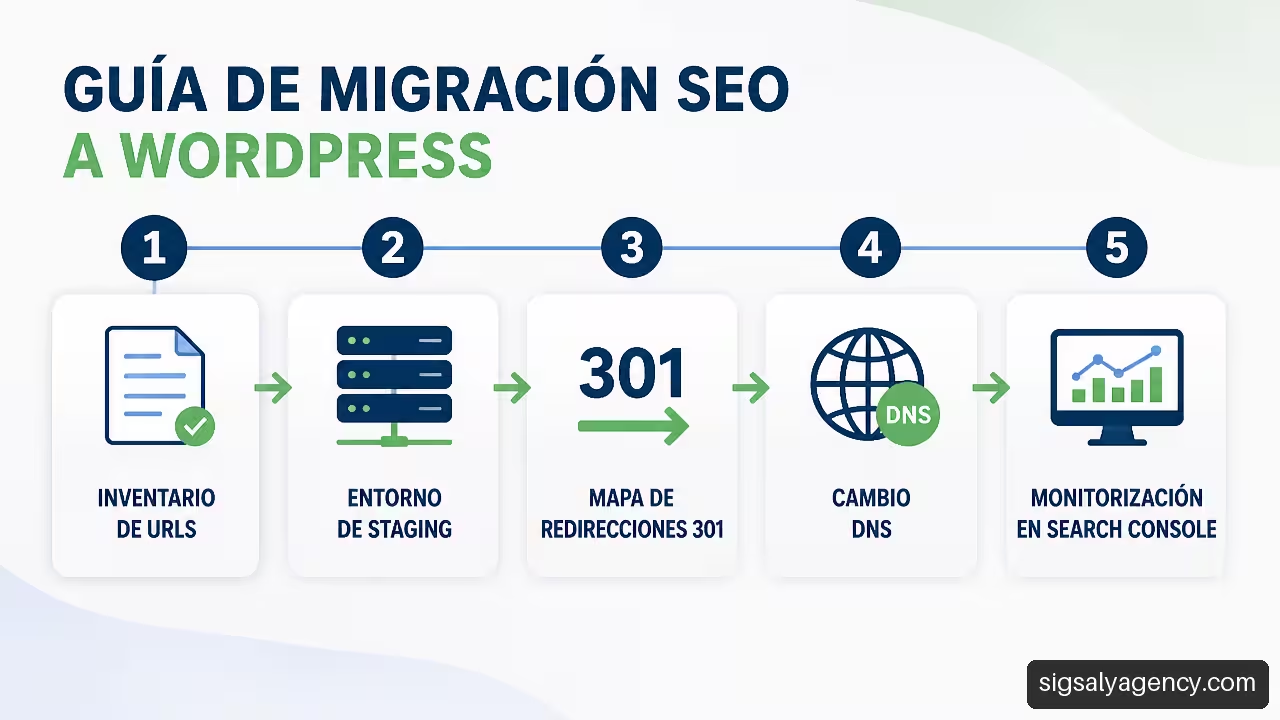
A robust validation compares the old and new sites at scale. Unimedia presents a page-by-page comparison Check titles, meta descriptions, canonical tags, structured data, hreflang tags, and internal links before launching. The method is applicable even if the target is WordPress: it's not just about checking that "the page loads," but about confirming that it retains its main signals.
Launch, Validate, and Fix After Change
Execute the Launch with a Rollback Plan
The launch day requires a specific sequence. First, content editing is frozen to prevent the old and new websites from accumulating different changes. Then, a final backup is performed, the last necessary data is loaded, redirects are activated, and the DNS is changed once testing is complete.
Keeping the old hosting active for a reasonable period makes it easier to revert to the old version if a critical error occurs. The rollback plan should specify who can restore the previous version, which backup will be used, what new data might be lost, and how the incident will be reported. This isn't a sign of distrust; it's a reasonable way to limit the impact.
Commercial functions require special attention:
• Contact forms and quotes.
• Confirmations by email.
• Purchase and payment processes.
• Private areas and password recovery.
• Clickable phones and mobile maps.
• Downloads of catalogs, data sheets or terms and conditions.
Review Crawling, Indexing, and Performance
After the change, it's advisable to crawl the domain again and compare status codes, titles, canonicals, internal links, and indexable pages. Google Search Console allows you to review coverage issues, sitemaps, excluded pages, and click and impression trends. If the architecture has changed, the XML sitemap should only contain the final URLs that you want indexed.
The review doesn't end with submitting the sitemap. You also need to check that WordPress isn't blocking pages due to reading settings or tags. noindexincorrect canonicals or rules in robots.txtTo expand on this section, you can consult the approach of Technical SEO to improve performanceespecially in crawling, indexing, and speed.
A drop in traffic doesn't always mean the migration has failed, but it shouldn't be ignored either. It could be due to variations in demand or seasonality. The key is to look for technical signals alongside performance data.
| Symptom | Possible Cause | First Check |
|---|---|---|
| Many old URLs returning 404 | Incomplete redirects | Compare inventory against server responses |
| Downturn in impressions | Indexing or content problems | Review Search Console, canonicals and noindex |
| Downgrade | Change of intent or reduced content | Compare text, titles, and internal links |
| Duplicate pages | HTTPS, www or poorly unified parameters | Review canonicals and redirection rules |
| Fewer conversions with stable traffic | Broken forms, UX, or measurement | Test routes and event analytics |
Prioritize the Corrections That Affect the Business
Not all errors are created equal. A broken image in an old post can wait. A service page that used to receive organic traffic and now returns a 404 error requires immediate attention. Prioritization should balance visibility, backlinks, revenue, and functional criticality.
During the first few weeks, it is helpful to check frequently:
- 404 errors originating from old URLs.
- Redirection chains and loops.
- Pages excluded or blocked from indexing.
- Changes in clicks, impressions, and top queries.
- Forms, sales, calls, and other conversion events.
- Speed and mobile experience of the most important pages.
There's no universal figure that guarantees a migration will be free of fluctuations. It depends on the site's size, simultaneous changes, the history of each URL, and how quickly issues are resolved. What is controllable is the process: reliable inventory, clear equivalencies, pre-testing, and post-migration monitoring.
Frequently Asked Questions
Is it possible to migrate an old website to WordPress without losing Google rankings?
Yes, but it's not possible to guarantee that all positions will remain identical. Maintaining URLs, relevant content, metadata, and internal links reduces the risk. If URLs change, permanent and direct redirects are essential to preserve continuity.
Should I keep the exact same URLs?
Whenever possible, yes. Maintaining them avoids unnecessary redirects and makes it easier to compare the old version with the new one. It's only advisable to modify them when the current structure is confusing, duplicated, or incompatible with a better-defined architecture.
What do I do with an old URL that doesn't have an exact equivalent?
First, look for a useful thematic alternative. If an older page about a particular service is integrated into a more comprehensive guide about that same service, it can redirect to that guide. If there's no reasonable equivalent, it's not advisable to automatically send it to the homepage.
How Long Should I Keep 301 Redirects?
There is no universally applicable timeframe for all sites. As a general rule, they should be maintained as long as external links, direct traffic, indexed historical URLs, or campaign references exist. Removing them too soon can turn visits and old links into 404 errors.
Should I change the DNS before or after testing the new website?
Afterward, the new environment should be tested using a temporary URL, hosts file, or other preview method. Changing DNS only makes sense once the site, redirects, and critical functions have passed testing.
How do I know if a drop in traffic is due to migration?
First, check if the affected URLs are returning 200 status codes, if their canonical tags are correct, and if Search Console is showing any indexing issues. Then, compare clicks, impressions, and queries before and after the change. If impressions drop and technical errors appear, the cause likely requires a migration review.
Do I also need to migrate images, PDFs, and other files?
Yes. Downloadable resources and images can receive traffic, links, or appear in search results. They should retain their URL whenever possible or redirect to an equivalent resource if their location changes.
Sources and References
• WordPress Developer Resources — Migrating WordPress: https://developer.wordpress.org/advanced-administration/upgrade/migrating/
• Dardo — Website migration without losing ranking: https://dardo.studio/es/servicios/migracion-de-pagina-web/
• ReyCob — Migrate WordPress without losing SEO: checklist: https://www.reycob.com/migrar-wordpress-sin-perder-seo/
• Unimedia — WordPress to static migration: fast and secure: https://www.unimedia.tech/es/migracion-de-wordpress-a-estatico/
• WordPress.com — How to migrate your WordPress website to another host: https://wordpress.com/es/go/tutoriales/migrar-sitio-web-de-wordpress/