
Creating a professional website in WordPress for a local business is not just about publishing an attractive page. The website must respond to a specific need: getting calls, budget requests, bookings, visits to the establishment or sales. To achieve this, you need to choose the platform carefully, organise the content, facilitate contact and prepare the site so that it can be found and maintained.
Table of Contents
- Choosing The Platform And Technical Foundation
- Design A Website That Guides The Contact
- Prepare Local SEO And Launch
- Key Takeaways
- Frequently Asked Questions
- Sources and References
Choosing The Platform And Technical Foundation
Deciding Between WordPress.com, Self-Hosted WordPress And Custom Development
For a local business, the choice should not start from the question 'what option is cheaper?', but from 'what should the website do within six, twelve or twenty-four months?'. A hairdresser that only needs to show services, hours and phone number does not have the same needs as a clinic with several professionals, online booking and admission forms.
| Option | Suitable When | Main Advantage | Limitation You Should Consider |
|---|---|---|---|
| WordPress.com | You prioritise simplicity and a small informative site | Part of the infrastructure is managed | The freedom to use themes and plugins depends on the plan |
| Self-Hosted WordPress | You need control over SEO, plugins, bookings or ecommerce | Greater flexibility and portability | Requires you to handle hosting, security and maintenance |
| Custom Development | You have complex processes or very specific integrations | Functions designed for a specific case | Usually requires more budget and more technical dependency |
WordPress.com may be a good fit if the priority is to publish quickly and limit technical management. Still, it is worth reviewing the plan before deciding: the documentation of [WordPress.com about plans, themes and plugins] itself WordPress.com about plans, themes and plugins explains that access to third-party plugins and certain customised themes depends on the contracted plan.
For most businesses wanting to grow with content, campaigns, advanced forms, bookings or a shop, self-hosted WordPress usually offers more margin. It doesn't mean it's automatically better. It means it allows you to choose your provider, move the site if your relationship with a third party changes, and control which extensions are installed.
Custom development makes sense when WordPress would require you to chain too many plugins to solve a critical operation. For example, a rental company with variable availability, seasonal rates, deposits and connection to an internal system. If the requirement is simply to collect requests, a well-designed form is usually more reasonable than a complex platform.
Choosing Domain, Hosting and Responsibilities
The domain should be easy to pronounce, remember and write. It's advisable to avoid long combinations, unnecessary numbers or names too similar to other brands. If the business operates with a consolidated brand, it's usually safer to prioritise it rather than adding all localities and services to the domain.
Hosting influences availability, backups, security and speed. It's not enough to compare disk space. Before hiring, I recommend you confirm these points:
• SSL/TLS certificate included and automatically renewed.
• Backups with a clear retention and restoration policy.
• Environment of staging to test changes without affecting the public website.
• Support that explains what it covers and what tasks remain the responsibility of the owner.
• Adequate resources for traffic, images, forms and planned functions.
The key question is who is responsible if something fails. A backup is not helpful if nobody knows how to restore it, if it has never been tested, or if it excludes essential files. Define from the outset who updates WordPress, the theme and plugins; who reviews alerts; and how content changes are approved.
Theme, Plugins And Performance Without Unnecessary Dependencies
The theme should not be chosen solely for visual demonstration. A template may look flawless with professional photos and sample text, but it may load many scripts, depend on a heavy visual builder or make simple changes difficult. Look for a theme compatible with the block editor, up-to-date, with good documentation and a structure that allows you to maintain your business identity without editing code every week.
Plugins add functionality, but each one incorporates code, updates and possible conflicts. It is preferable to meet a specific need with a reliable extension than to install several plugins that do almost the same thing. A prudent initial setup could include:
• A security plugin and access control.
• A backup solution if hosting does not cover it sufficiently.
• A form with anti-spam measures and privacy notices.
• A caching tool compatible with the server.
• An SEO solution that helps edit titles, descriptions and metadata.
Speed does not depend solely on WordPress. The server, theme, images, cache, analytics scripts, fonts and plugins all play a role. That is why a promise of a strategic guide for professional web design.
Design A Website That Guides The Contact
Creating A Local Conversion Architecture
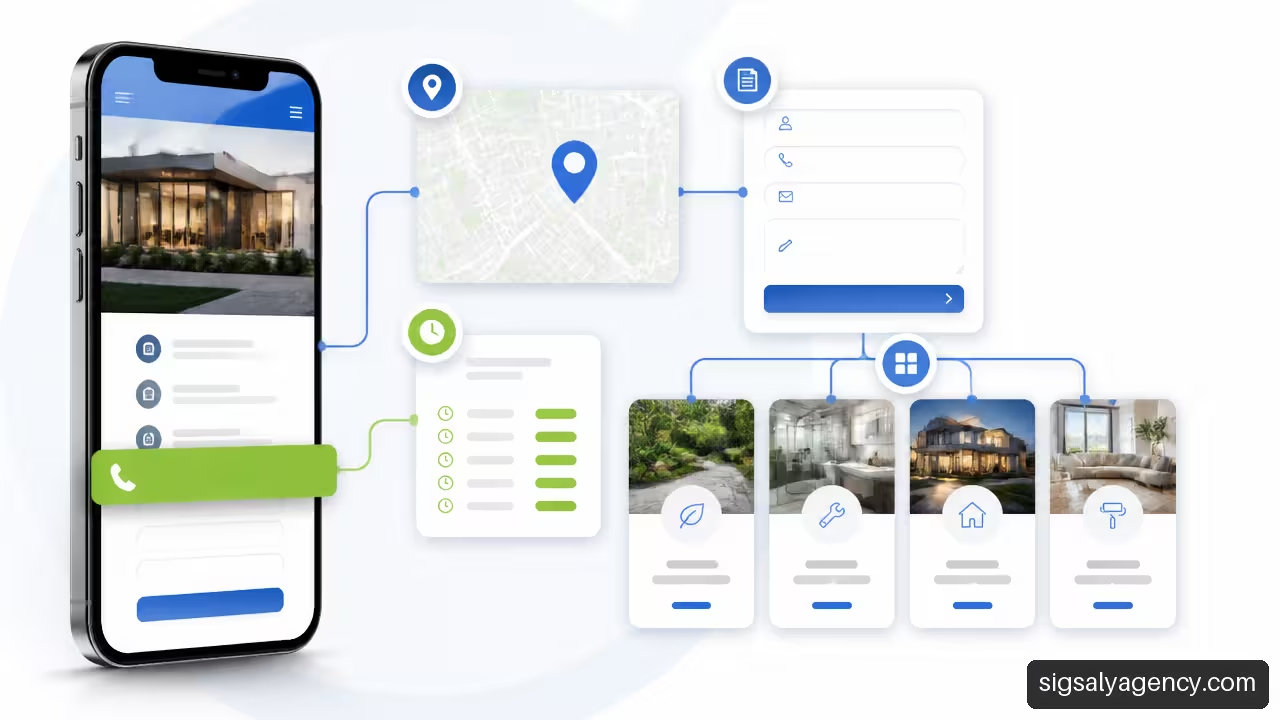
A local website works better when each page has a clear mission. The homepage should explain what you do, who you serve, where you work and what the next step is. A service page should answer questions about that service. The contact page should reduce friction: clickable phone number, brief form, opening hours, address or service area and route options when a physical location exists.
Not all businesses need the same sections, but a minimum architecture usually includes:
| Page | Question It Solves | Main Action |
|---|---|---|
| Start | What does this business offer and why should you consider it? | Call, request a quote or book |
| Services | What does each solution include and who is it for? | Request specific information |
| About The Business | Who is behind it and how do they work? | Build trust before making contact |
| Contact | How can I contact or reach the location? | Call, message or request directions |
| Location Or Service Area | Do you serve my area and where are you located? | Confirm coverage or plan a visit |
Imagine a renovation company that serves a city and nearby municipalities. If all information is on a single generic page, the visitor will have to search to see if they do bathroom renovations, if they work in their municipality and how to request a quote. Instead, a clear page per service, accompanied by a well-explained service area, reduces that effort.
There is no need to create dozens of nearly identical pages for each neighbourhood. This can generate poor content that is difficult to maintain. Create a local page when there is real information to contribute: travel conditions, specific service, assigned team, authorised projects, opening hours or service particularities.
Design The Homepage For Mobile
Many local visits happen from a mobile phone and with little patience. The first block of the page should allow you to understand the business in seconds. Avoid ambiguous headlines like 'quality solutions' if you can say 'Boiler repairs in [zone] by appointment'.
A homepage aimed at contact usually includes, in this order:
- A clear proposal with the service and area served.
- A visible button to call, book or request a quote.
- Trust proofs, such as verified reviews, verifiable certifications or explanation of the process.
- Main services with links to more detailed information.
- Real photographs and complete local data.
- A final call to action for someone already prepared to make contact.
Real images help when they resolve specific doubts. A photo of the storefront allows you to recognise the premises. An image of the entrance can clarify whether there are steps or parking. A photograph of the team humanises a professional service. In product businesses, images should show scale, finishes and context of use, not just a decorative composition.
Seomarket's guide to texts, real images and contact details for a business highlights precisely the usefulness of preparing these elements before design. Having them ready avoids filling the website with generic messages or photographs that do not represent the real experience.
Template Or Bespoke Design
A customised template can be a sensible decision when the business needs a clear, coherent and maintainable website without creating special functionalities. The key is to adapt the template to the brand, structure and content, not just to change colours and logo.
Bespoke design adds more value when there is a demonstrable need: a budget calculator, a booking with complex rules, a catalogue with specific filters or a differentiated shopping experience. If that need does not exist, the additional cost and maintenance may not be justified.
To assess both options, it is worth reviewing the complete scope of web development and design with WordPress: design, architecture, content, integrations, testing and subsequent support are part of the decision, not just the initial appearance.
Prepare Local SEO And Launch
Keep Business Data Consistent
Local SEO starts with reliable data. The business name, address, phone number, opening hours and service area must match across the website, Google Business Profile and relevant channels. This consistency is often called NAP, for the acronym of name, address and phone.
Before publishing, check cases that usually cause errors:
• A business with two locations must clearly differentiate each address, opening hours and telephone number when they differ.
• A company that operates from home should not display a private address as a business open to the public if it does not receive clients there.
• A business with split opening hours should reflect this without simplifying it in a misleading way.
• If the telephone number is used for campaigns, there must still be a stable and verifiable reference for regular contact.
Google's website and Business Profile must complement each other. The business listing provides local visibility; the website allows you to explain services, terms, process and reasons to contact. For that journey to make sense, connect the location or contact page from the listing and avoid sending users to a homepage that does not respond to their intention.
Using Structured Data Without Unrealistic Promises
Structured data LocalBusiness is code that helps search engines interpret information such as the business name, address, opening hours or telephone number. It does not replace visible content or correct inconsistent data. It also does not guarantee a specific position or an enriched result.
Google explains in its documentation about structured data for local businesses the guidelines, validation requirements, URL inspection, crawling and the use of sitemaps. The practical implication is simple: only add data that appears and is verifiable on the page, test the markup before publishing it and check afterwards that the URL is accessible to Google.
A page blocked by robots.txt, marked with noindex or protected by login cannot be used as an indexable page, even if its markup is technically correct. In addition, after publishing changes, crawling and reindexing can take several days. It is not advisable to interpret that timeframe as an automatic failure.
Implementing A Local Launch Protocol
Publishing without checking essential elements can turn a good website into a source of lost contacts. Before opening it to the public, conduct a review from a real mobile device, not just from the desktop.
- Check that the main domain loads with HTTPS and that alternative versions redirect correctly.
- Send test forms and confirm that they reach the right recipient, without falling into spam.
- Click all phone numbers, WhatsApp buttons, email links, bookings and maps.
- Review the address, opening hours, service area and legal texts.
- Confirm that important pages can be indexed and that they do not contain tags
noindexby mistake. - Generate or update the sitemap and submit it via Google Search Console when appropriate.
- Measure useful actions: forms submitted, phone clicks, route requests, bookings and messaging clicks.
- Keep a restore point before relevant changes and test the website after updating it.
Measurement should focus on business actions, not just visits. A restaurant may prioritise bookings and directions; a law firm, qualified forms; a shop, purchases and calls. Traffic without intent may look positive on a graph, but it doesn't always help sustain the business.
The work doesn't end at launch. A reasonable monthly review can include updates, backups, form checks, mobile performance, indexing errors and outdated content. If new plugins are installed or templates changed, do it first in staging when possible. That way, a conflict doesn't leave the public website unusable.
The website gains value when coordinated with campaigns, content and measurement. This relationship between lead generation and digital presence is developed in web design and online marketing, especially useful if the goal is to combine local SEO with paid actions or content.
Key Takeaways
Decisions That Most Influence The Result
• Choose WordPress.com, self-hosted WordPress or bespoke development based on functionality, control and maintenance, not just on initial price.
• Design each page for a specific action: call, book, request a quote, visit the location or purchase.
• Use your own content and consistent local data so that visitors understand what you offer, where you operate and how to contact you.
• Install only the necessary plugins and assign responsibility for updates, backups and restoration.
• Treat structured data as an aid to interpreting information, not as a promise of better rankings.
• Measure contacts and business actions. Visits are an indicator, but they are not the ultimate goal.
Frequently Asked Questions
Is WordPress A Good Option For A Small Local Business?
Yes, it can be a very suitable option if configured with a simple structure, a maintainable theme and features tailored to the business. It is especially useful when you need to publish services, update opening hours, create local content or add bookings and forms. If the project requires a complex application with its own operational rules, it is worth considering bespoke development or a specific integration.
What Is The Difference Between WordPress.com And WordPress.org For A Business?
WordPress.com offers a hosted service where part of the technical management is handled by the provider. WordPress.org usually refers to WordPress installed on hosting chosen by the business. The second option provides more control, but it also means assuming or contracting maintenance, security and updates.
How Much Does It Cost To Create A Professional Website In WordPress?
There is no reliable universal figure because the cost depends on content, visual identity, number of pages, photography, integrations, e-commerce, bookings and maintenance. An informative site with an adapted template usually requires less work than a website with a catalogue, payments, automations or multiple locations. Request quotes with detailed scope and confirm what happens after publishing.
What Pages Does a Local Business Need as a Minimum?
As a base, you usually need a homepage, services, contact and a page that explains the business or working method. If there is a physical location or relevant territorial coverage, add location information or service area. The priority is not to accumulate pages, but to answer the questions that prevent contact.
Do I Need a Page for Each Service or Area Where I Work?
Create a page per service when you can explain what it includes, who it is for, how to request it and what concerns it resolves. For geographical areas, publish pages only if they provide their own useful content. Changing the name of a city in repeated text does not improve the user experience or make maintenance easier.
Do LocalBusiness Structured Data Improve My Position on Google?
They do not guarantee positions or enriched results. They serve to help Google interpret business data when applied following its guidelines. They should be accompanied by an accessible page, real content, consistent information and correct indexation configuration.
How Can I Measure Calls, Forms and WhatsApp Clicks?
First define what counts as a conversion. Then set up events for form submissions, phone clicks, messaging buttons, bookings and route requests. Also check that those actions work on mobile. A measured event that does not generate real communication, for example a form that does not reach email, does not represent a valid contact.
Who Should Be Responsible For WordPress Maintenance?
There must be a person or supplier responsible with clear tasks and frequency. At minimum, that responsibility should cover updates, backups, restoration, form review, administrator user control and testing after major changes. Leaving it unassigned often turns a small problem into a more costly incident.
Sources and References
• Google Search Central — Local Business Structured Data: https://developers.google.com/search/docs/appearance/structured-data/local-business
• WordPress.com Developer Resources — Creating a new site: https://developer.wordpress.com/es/docs/introduccion/construir-nuevo/
• Seomarket — I need a professional website: getting started guide: https://seomarket.es/blog/diseno-web/pagina-web-profesional-negocio/