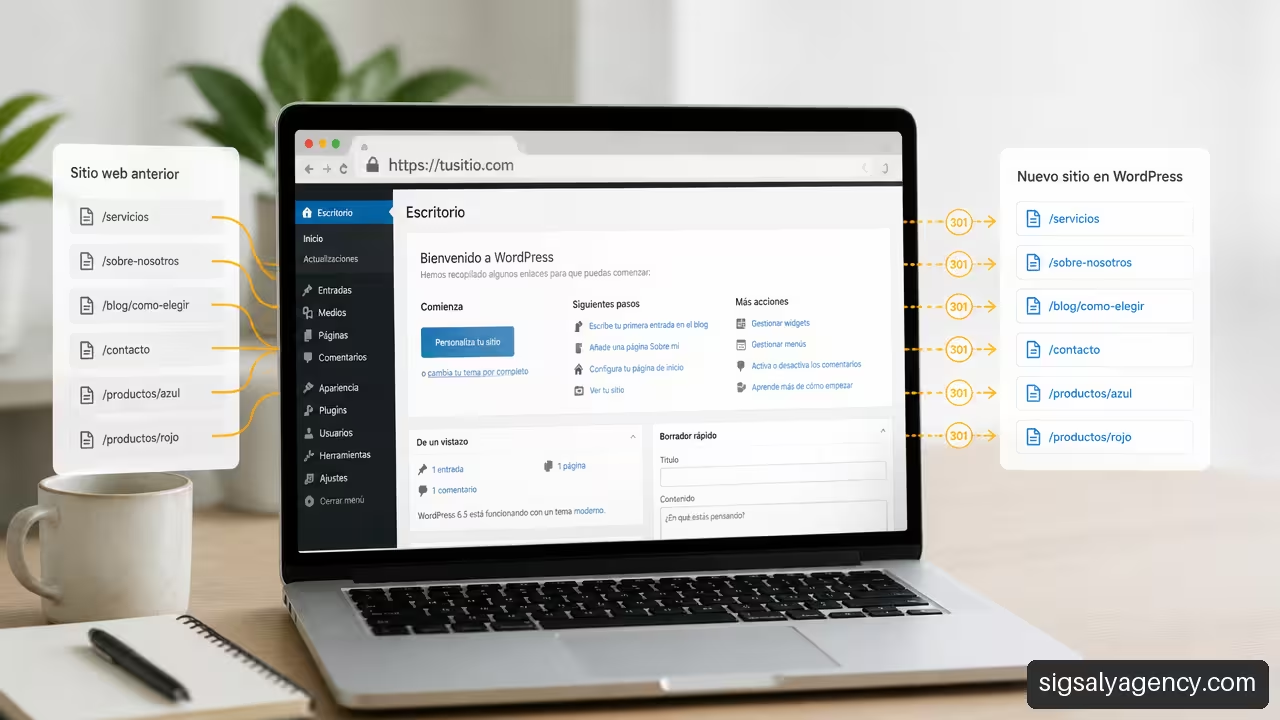
Migrating a website to a new CMS doesn't necessarily mean losing the addresses that users and search engines already know. To understand how to move a website to WordPress while maintaining its URLsIt is advisable to treat migration as a web architecture project: first, the current routes would be inventoried, then they would be reproduced or redirected with criteria, and finally, each server response would be validated.
A well-planned migration can preserve the domain, page and post paths, internal links, and a significant portion of accumulated SEO signals. The risk arises when a new website is launched without having decided what will happen to each of the old URLs. A new design might be ready; a broken link structure, however, might not.
Table of Contents
- Key Points Before Migrating
- Planning the URL Map and WordPress Structure
- Execute, Test, and Monitor the Migration
- Frequently Asked Questions
- Sources and References
Key Points Before Migrating
The main rule is simple: if a URL can remain the same, it's usually best to keep it. If it must change, the old URL needs a permanent destination that fulfills the same user intent. Simply moving all deleted pages to the homepage isn't enough.
A secure migration is not just about moving content. It's about preserving the pathways that connect users, search engines, bookmarks, and external links to that content.
| Situation During Migration | Recommended Action | Risk If Ignored |
|---|---|---|
| Same URL, new WordPress | Recreate the exact route in WordPress | Unnecessary 404 errors |
| Old URL with new equivalent | Create a direct 301 redirect | Loss of signal and bad experience |
| Page removed with no real alternative | Maintain a 404 or return a 410 if applicable | Irrelevant redirect to the homepage |
| Change of domain from temporary to permanent | Replace internal links before publishing | Links pointing to the temporary domain |
| Change of protocol from HTTP to HTTPS | Review redirects, canonicals, and resources | Mixed content and redirect chains |
Understanding Exchange Rates Prevents Mistakes
Before touching WordPress, I separate the changes into four groups. This classification clarifies how much redirection work will be necessary.
- Change of accommodation: The domain, protocol, and routes remain the same. In theory, redirects shouldn't be necessary due to URL changes, although thorough testing is still required.
- CMS change: It is being migrated from another platform to WordPress, but an attempt is being made to maintain the same domain and the same link structure.
- Structural change: Directories, categories, slugs, trailing slashes, or date formats change. A detailed redirection map is needed here.
- Domain or protocol change: The domain is modified, HTTP is switched to HTTPS, or both changes are combined. This is a separate operation and requires reviewing all access variants.
For example, to move https://example.es/services/web-design/ WordPress while maintaining that exact address is very different from replacing it with https://example.es/web-design/The content can be the same, but the second option requires a 301 redirect from the old path.
Google's documentation recommends that a migration with URL changes be planned with an equivalence map and permanent redirects between the old addresses and their new destinationsThis equivalence must be semantic: a specific guide should lead to its updated version, not to a generic category or the home page.
What Must Be Retained for a URL to Be Identical
A URL doesn't depend solely on the visible text of a page. To preserve it without changes, several elements must be checked simultaneously:
• The protocol: https:// rather http://.
• The subdomain: www.example.es It is not technically the same as example.es.
• The route: /blog/tips/ It must match letter by letter with the previous path.
• The trailing bar: some servers treat it differently /services and /services/.
• Uppercase and lowercase letters: in many Linux environments, /Blog/ and /blog/ They can be different resources.
• Relevant parameters: A campaign URL does not usually require a separate page, but certain functional parameters may need a specific rule.
WordPress allows you to customize permalinks, but it doesn't always natively reproduce a complex legacy structure. If the previous site used paths like /news/2022/article-title.htmlIt may be necessary to combine permalink settings, manual slugs, and redirection rules.
To understand how the content, templates, and routes are organized before rebuilding it, it's helpful to review WordPress as a CMSThe decision should not be based solely on whether a URL "looks good"; it should allow the site to be published and maintained without creating a difficult-to-manage structure.
Inventory: The Document That Prevents Blind Decisions
It's not advisable to rely solely on the XML sitemap as your inventory. A sitemap can omit historical URLs, non-indexable pages, downloadable documents, or paths that continue to receive external links. It's more prudent to combine different sources:
• Current XML Sitemap.
• Web analytics data, especially landing pages with visits.
• Google Search Console, to review indexed URLs, errors and performance.
• Tools for tracking the old site.
• Server logs, if available.
• List of relevant external links.
The result should be a spreadsheet with one row per URL. This isn't just an administrative task: it will be the basis for testing before and after launch.
| URL Map Field | Example | What is it for? |
|---|---|---|
| Old URL | /blog/guia-seo.html | Identify the published resource |
| Content type | Article | Apply the appropriate rule |
| new URL | /blog/seo-guide/ | Define the final destination |
| Action | Keep or 301 | State the expected answer |
| Expected state | 200, 301, 404 or 410 | Validate the technical result |
| Priority | High | Review critical pages first |
Planning the URL Map and WordPress Structure
The planning phase is where you decide whether the new installation will respect the site's history or accidentally delete it. You don't need to publish yet. You need to define clear rules.
Create Real Equivalencies, Not Mass Redirects
Each legacy URL should receive one of these decisions:
- It remains: The URL exists in WordPress and returns a 200 status.
- It redirects to an equivalent: The old URL returns a 301 to a new page with the same purpose.
- Retirement without replacement: returns 404 or, in justified cases, 410.
- It is consolidating: Several very similar URLs point to a single new and relevant page.
The difference between consolidation and indiscriminate redirection is important. Suppose a page about “online store maintenance” is removed. Redirecting it to a specific maintenance page might make sense. Redirecting it to the homepage simply because “there’s no other page” can frustrate someone arriving from a saved link.
A chain of redirects should also be avoided. The ideal path is:
Old URL → Final URL
It is not advisable to create this other route:
Old URL → Temporary URL → New URL → Final URL
Each hop adds time, complicates tracing, and makes it harder to detect errors. If an old redirect already exists, it must be updated to go directly to the final destination.
Configure WordPress Without Altering Necessary Paths
In WordPress, post and page URLs depend primarily on permalinks, slugs, and server-side rewrite rules. Before importing content, it's advisable to decide what structure your project needs.
For example, if the previous website publishes articles in /blog/article-name/The configuration and organization of the content must replicate that path. If categories must appear in the URL, it's necessary to assess whether that structure is sustainable. Changing it later would require creating new redirects.
A technical WordPress migration requires reviewing the site configuration and constants. WP_HOME and WP_SITEURL, the permanent links, .htaccess and the rules of rewriting. The guide to WordPress Developer Resources technical migration It also advises making a copy of the file .htaccess before modifying it and testing the redirects afterwards.
This is especially relevant if you are using custom Apache rules. .htaccess New rules generated by WordPress may work for standard posts, but they won't necessarily preserve old rules for PDFs, special directories, or legacy paths.
The reconstruction must include, at a minimum:
• Custom pages, posts, and content types.
• Categories, tags, and archives when their URLs are public.
• Images, documents, and other files linked from older content.
• SEO titles, meta descriptions, canonicals, and structured data that remain relevant.
• Internal links, menus, calls to action, and references to downloadable resources.
For projects where design, editorial structure, and technical configuration need to progress in a coordinated manner, this guide on web development and design with WordPress broadens the approach to building a maintainable website.
Treat Secondary URLs as Part of the Project
Many migrations validate the main pages and overlook routes that may also receive traffic or links. It won't always be necessary to preserve all of them, but it is important to decide what should happen to them.
| URL Type | Usual Decision | Necessary Check |
|---|---|---|
| Multimedia files | Keep or redirect if they are linked | Review old images and documents |
| Categories and tags | Keep if they contribute navigation or traffic | Avoid empty or duplicate files |
| Pagination | Recreate if it has useful indexable content | Verify links next and prev internal |
| Feeds | Maintain if subscribers or integrations exist | Check the feed response |
| Internal searches | Normally not indexed | Avoid generating thousands of crawlable URLs |
| URLs with parameters | Evaluate based on function and traffic | Do not redirect campaigns unnecessarily. |
There's no one-size-fits-all rule for these types of products. A store with external links to product pages needs to review each removed product in much more detail than a corporate website with just a few pages. The decision depends on the URL's function, its traffic, its backlinks, and the possibility of offering a suitable replacement.
Manage Temporary Domains and Internal Links
A common mistake occurs when the website is built on a temporary domain, such as project.server.comThe final domain is then assigned. Changing the primary domain does not automatically correct links within pages, buttons, images, or custom fields.
WordPress.com warns that Setting the primary domain does not, by itself, replace links that still point to a temporary domainTherefore, before releasing the new version to the public, these references must be searched for and replaced in a controlled manner, including multimedia resources and manually inserted links.
Execute, Test, and Monitor the Migration
The publication should not be the first time the site is tested. A reliable migration is validated in three states: before the DNS change, during the transition, and after the new version is made public.
Test the Real Domain Before Changing DNS
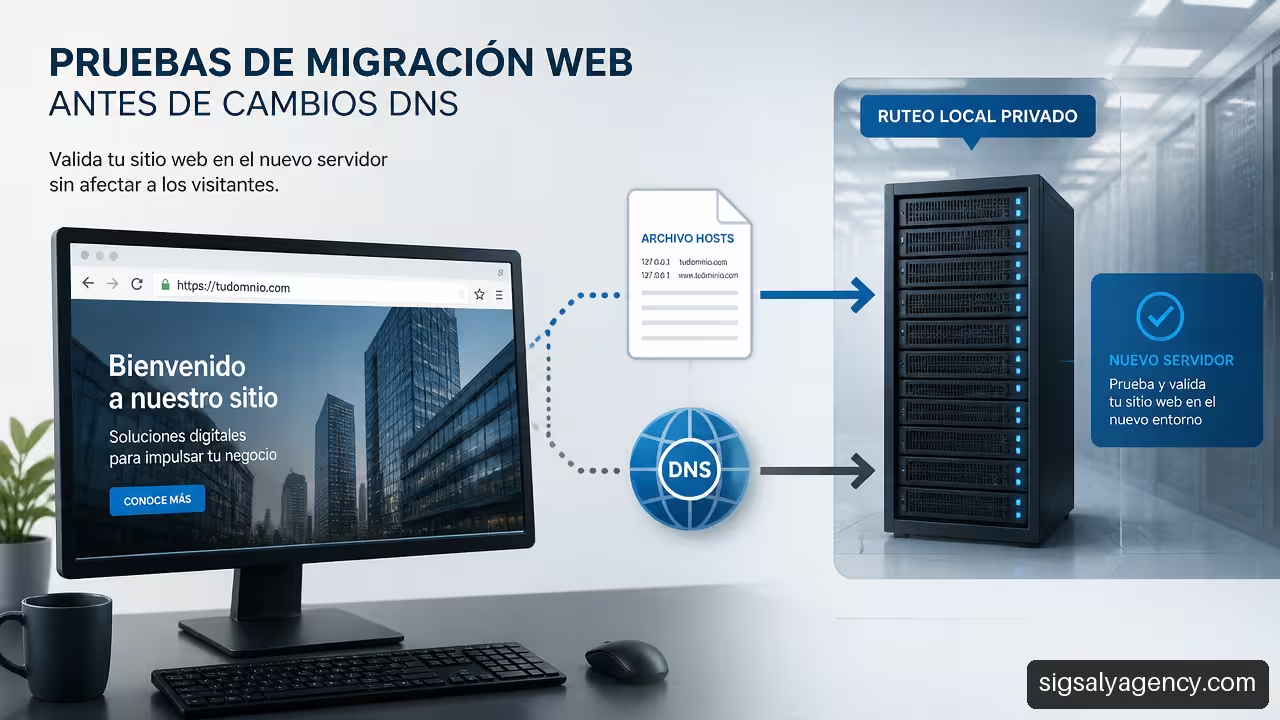
A staging environment allows you to review content and functionality, but it's also important to check how the live domain responds to the new server. For this, you can use the configuration file. hosts from the test computer. This technique ensures that only that computer resolves the domain to the new IP address, without changing the public DNS for the rest of the users.
The WordPress.com guide explains that The hosts file allows you to test a domain locally against the new server.It is useful for detecting resources loaded from the previous server, misconfigured certificates, or redirects that only fail when using the final domain.
A reasonable sequence of tests would be:
- Save a verifiable copy of the old site, its files, its database, and its settings.
- Migrate content and files to WordPress in an isolated environment.
- Configure slugs, permalinks, and redirects according to the URL map.
- Test the website with the real domain using the file
hosts. - Review a representative sample and all priority URLs.
- Change the DNS when the tests are successful.
- Monitor responses, tracking, and traffic in the days that follow.
Validate HTTP States, Links, and Resources
It's not enough to see that the homepage loads. You have to check what the server returns when each old and new address is requested.
| Proof | Correct Result | Trouble Sign |
|---|---|---|
| URL preserved | State 200 | 404 or unexpected redirect |
| URL modified | 301 direct to the final URL | Chain of several jumps |
| Page removed | 404 or 410 when there is no equivalent | 301 generic to the cover |
| HTTPS URL | Safe charging without notifications | HTTP resources or wrong certificate |
| Internal link | Leads to a valid final URL | Temporary domain or broken link |
It's also worth checking trailing slashes. If WordPress adds a slash and the server forces its removal, a loop can be created. The symptom is usually that the browser reports too many redirects. The solution isn't to add more rules randomly: you need to identify which layer is forcing each version, whether it's WordPress, .htaccess, the web server, a CDN, or a hosting configuration.
After launch, the XML sitemap helps communicate current URLs, but it doesn't replace the migration map. It's advisable to submit the updated sitemap to Search Console and monitor coverage errors, pages not found, indexing changes, and traffic trends to priority URLs.
The subsequent review fits within a broader work of Technical SEO to improve performanceespecially when it comes to analyzing tracking, canonicals, response times, and server errors.
Maintaining Redirects and Fixing Issues
There is no single, universally agreed-upon timeframe for removing redirects. Maintaining them for an extended period is generally prudent, especially if they receive visits, external links, or crawler requests. The decision to remove them should be based on data: logged traffic, active links, crawl frequency, and a sustained absence of requests.
If an old URL continues to appear in logs or receives traffic from external links, removing it can create a avoidable 404 error. In contrast, a rule with no requests for a long time and no known links can be more safely re-evaluated. The key is not to remove redirects on a schedule without reviewing their actual usage.
Frequently Asked Questions
Is it possible to migrate a website from another CMS to WordPress while keeping exactly the same URLs?
Yes, provided WordPress can reproduce the old domain, path, and slug. If the old structure contains elements that WordPress cannot generate natively, additional adjustments or 301 redirects may be necessary. The important thing is to decide URL by URL, not to assume that changing CMSs automatically preserves the addresses.
When Do I Need a 301 Redirect and When Don't I?
You don't need a 301 redirect when the old URL still exists and returns a valid 200 response. You need it when the address changes and a new, equivalent page exists. If the content disappears without a useful replacement, a 404 or 410 redirect can be more honest than redirecting to an irrelevant page.
How should I transfer the URLs of categories, tags, and images?
First, check if those URLs receive traffic, have links, or are part of the navigation. Useful categories and tags can be replicated in WordPress. Images and documents should retain their paths or be redirected if they are linked from older content. Don't decide based solely on aesthetics: an image URL might be embedded on an external website.
What do I do if WordPress adds or removes the trailing bar?
Define a canonical version and ensure that WordPress, your server, and any CDNs enforce the same rule. Then test both versions. If a URL repeatedly redirects between the version with and without the slash, there's a configuration conflict that needs to be resolved before publishing.
How do I detect redirection chains or loops?
Test the old URLs and observe each hop to the final page. A chain occurs when there are multiple consecutive redirects. A loop occurs when a rule returns the user to a URL they've already visited. Crawling tools and HTTP headers help identify these, but a manual sample of priority URLs is still useful.
Should I redirect all deleted pages to the homepage?
No. Redirect only when a clearly related destination exists. A retired service page can redirect to an equivalent service; an outdated guide can redirect to an updated version. If there is no real alternative, it is preferable for the server to communicate that the resource no longer exists.
What Should I Check in Google Search Console After the Change?
Review indexing, page not found errors, excluded URLs, submitted sitemaps, and the performance of pages that previously attracted traffic. It's also a good idea to compare old and new URLs during the first few weeks to identify destinations that aren't being crawled or redirects that aren't working as expected.
Sources and References
- Google Search Central — Site Moves and Migrations: https://developers.google.com/search/docs/crawling-indexing/site-move-with-url-changes
- WordPress Developer Resources – Migrating WordPress: https://developer.wordpress.org/advanced-administration/upgrade/migrating/
- WordPress.com — How to migrate your WordPress website to another host: a complete guide: https://wordpress.com/es/go/tutoriales/migrar-sitio-web-de-wordpress/
- WordPress.com — Migrating a WordPress site to WordPress.com hosting: https://wordpress.com/es/support/importar/pasar-de-wordpress-autoalojado-a-wordpress-com/
- WordPress.org Spain — Migrate my website to WordPress: https://es.wordpress.org/support/topic/migrar-mi-web-a-wordpress/