When they ask me when it is necessary to redesign a corporate website, my answer doesn't start with whether the design looks old. A website should be redesigned when it stops helping the business: it doesn't explain the offering well, it creates friction before contact, it doesn't work properly on mobile, it limits the team or prevents measuring results.
A corporate website is not just a shop window. It's a meeting point between the brand, user needs, the commercial process and technology. If one of those pieces fails in isolation, perhaps targeted adjustments will suffice. If several fail at the same time, website redesign stops being an aesthetic decision and becomes an operational one.
Table of Contents
- Signs That Justify A Website Redesign
- How To Decide Between Optimising Or Redesigning
- How To Prepare The Redesign Without Creating New Problems
- Key Points
- Frequently Asked Questions
- Sources
Signs That Justify A Website Redesign
The Website No Longer Represents The Real Business
A redesign is reasonable when the website is still selling a previous version of the company. This can happen after a change of positioning, a new service line, a merger, market expansion or a visual identity update.
The problem is not just about image. If the value proposition is not understood in a few seconds, the visitor doesn't know if the company can solve their need. On a B2B website, for example, a homepage that talks about generic services but omits sectors, processes or results can reduce the quality of business contacts.
I would review these elements especially:
• The main message on the homepage.
• The services that are actually being sold today.
• Priority customer profiles.
• Success cases, testimonials and available resources.
• The visual and verbal tone of the brand.
A logo change alone does not always require rebuilding the website. But if the new brand changes the audience, price, offering or way of selling, it usually affects the information architecture, content and conversion journeys.
Users Experience Friction Before Converting
A website can attract visits and still harm sales. This happens when the user reaches a relevant page, but must search too hard to understand what to do next. Lengthy forms, confusing menus, poorly visible calls to action, pages with too many messages and fragmented contact processes are frequent symptoms.
Conversion is not limited to an online sale. On a corporate website, it can be requesting a proposal, calling, downloading a technical sheet, booking a meeting or starting a business conversation. The important thing is to define what action brings value to the business and measure it consistently.
A low conversion rate does not by itself demonstrate that a redesign is needed. First, you must check the intention of the traffic, the clarity of the offer and the funnel performance.
Some publications use 2.5% as a reference guideline for conversion, but Studio Contra warns that this figure depends on the sector, traffic source, offer and type of conversion. A brand campaign aimed at repeat customers should not be evaluated the same way as a cold acquisition campaign.
Mobile Experience, Speed Or Accessibility Fail
A corporate page needs to respond well on small screens, irregular connections and different browsers. If the text requires zooming in, buttons are too close together, the menu covers the content or the form is uncomfortable, it's not enough to claim that the website is responsive: you need to review how it's actually used.
It's also worth separating the feeling of slowness of measured performance. A page may load quickly on an office computer and feel sluggish on a mid-range mobile device with limited coverage. That's why I would analyse real user data, specific templates and landing pages, in addition to technical tests. Core Web Vitals can help detect loading, response and visual stability issues, but do not replace a review of the complete user journey.
Accessibility deserves the same level of attention. Insufficient contrast, images without alternative text, forms without clear labels, navigation impossible with keyboard or ambiguous error messages affect the experience of many people. If these failures repeat throughout the component system, a redesign may be more efficient than fixing screen by screen.
To expand these criteria, it is useful to consult this strategic guide on professional web design; focused on accessibility, performance and digital experience quality.
The CMS And Integrations Have Become An Obstacle
Maintainability is a less visible but decisive signal. If publishing a simple news article requires opening a ticket, if updating an image can break a template or if the team doesn't know which blocks it can edit, the website consumes resources that it should save.
NakyTec points out that relying on another person to modify text or images may indicate that the platform or content management process no longer meets operational needs. That dependency does not always force a complete rebuild, but it does require reviewing the CMS, permissions, reusable components and content governance.
The problem is compounded when key integrations fail: forms that don't send contacts to the CRM, poorly configured cookie consent, incomplete analytics, unreliable internal search, catalogues impossible to update, or disconnected commercial automations. In those cases, the redesign should not be limited to a new interface; it must correct the technical foundation and processes that support the site.
How To Decide Between Optimising Or Redesigning
Start With The Templates And Flows Of Greatest Impact
Before approving a comprehensive redesign, I would identify which pages generate business and which introduce friction. It's not the same thing to have a poor contact page as to have an entire architecture incapable of guiding users from different profiles.
A useful audit usually reviews:
- Entry pages with the most qualified sessions.
- Templates that concentrate conversions, such as services, categories, product sheets or contact.
- The steps prior to each important action.
- Devices, channels and campaigns with poor performance.
- Technical errors, internal searches and form abandonments.
Imagine a professional services company that receives SEO traffic to twenty pages, but 70% of requests come from three of them. If those three pages have confusing messages, lengthy forms and weak calls to action, it's worth testing improvements there before rebuilding the entire site. If, on the other hand, each service uses a different structure, the menu doesn't reflect the current offer and there is no safe way to publish new pages, the problem is already systemic.
A Practical Matrix For Choosing The Scope
The age of a website is not a sufficient criterion. A five-year-old page can perform well and be easy to maintain; one that is twelve months old can be poorly designed from the outset. My recommendation is to assess impact, extent of the problem, technical dependency and cost of continuing to patch.
| Situation Detected | Scope Of The Problem | Most Common Decision | Risk Of Not Acting |
|---|---|---|---|
| A landing page converts poorly, but the rest of the site works | Localised | Optimisation and testing of messaging, design or form | Continuing to pay for traffic that generates no opportunities |
| Several pages have poor mobile experience | Repeated in templates | Redesign of critical components and templates | Abandonment and negative brand perception |
| The structure does not reflect current services or audiences | Architectural | Strategic redesign and content inventory | Disoriented users and low commercial relevance |
| The CMS does not allow safe or quick changes | Technical and operational | Platform migration or reconstruction | Dependency, errors and increasing maintenance costs |
| Commercial integrations fail | Systemic | Technical redesign with integration validation | Lost leads and incomplete data |
A serious comparison should include the cost of opportunity. If a campaign generates visits but the web makes contact difficult, the effective cost per lead can increase even if the advertising cost does not change. In that scenario, adding more budget to acquisition can amplify an already existing leak.
The decision should unite business, user experience, marketing, technology and SEO. Quois's approach to evaluating all those factors together is more useful than deciding solely on visual appearance.
When Not to Redesign Yet
Not every symptom requires a rebuild. Redesigning without diagnosis can transfer the same problems to a new platform, with more cost and more risk.
I would avoid approving a complete redesign when any of these situations occur:
• There is no conversion measurement or sufficient data to identify the problem.
• Traffic is scarce and still does not allow distinguishing between website failure and lack of demand.
• The offer is unclear, but the platform and structure are valid.
• Poor performance is concentrated in a single template, plugin or multimedia resource.
• The team has not defined who will update content after launch.
For example, a company might think it needs a new website because it receives hardly any enquiries. However, if most visits come from a campaign targeting an unqualified audience, the main problem might be segmentation, not design. The website needs review, yes, but not necessarily a complete rebuild.
How To Prepare The Redesign Without Creating New Problems
Define Objectives Before Designing Screens
An effective redesign starts with business decisions. Before choosing typefaces, colours or animations, it's worth agreeing what should improve and how it will be measured. Without that foundation, it's easy to launch a visually attractive website that doesn't reduce friction or support commercial work.
Objectives can include:
• Increase budget enquiries from priority services.
• Improve understanding of a new value proposition.
• Reduce the time needed to publish content.
• Connect forms, CRM and analytics without data loss.
• Improve mobile experience and accessibility.
Each objective should have a metric, a responsible party and a review period. There's no need to promise a universal percentage improvement. It's better to establish a real baseline: current conversions, form abandonment rate, publishing time, integration errors or visibility of strategic URLs.
Protect SEO During Migration
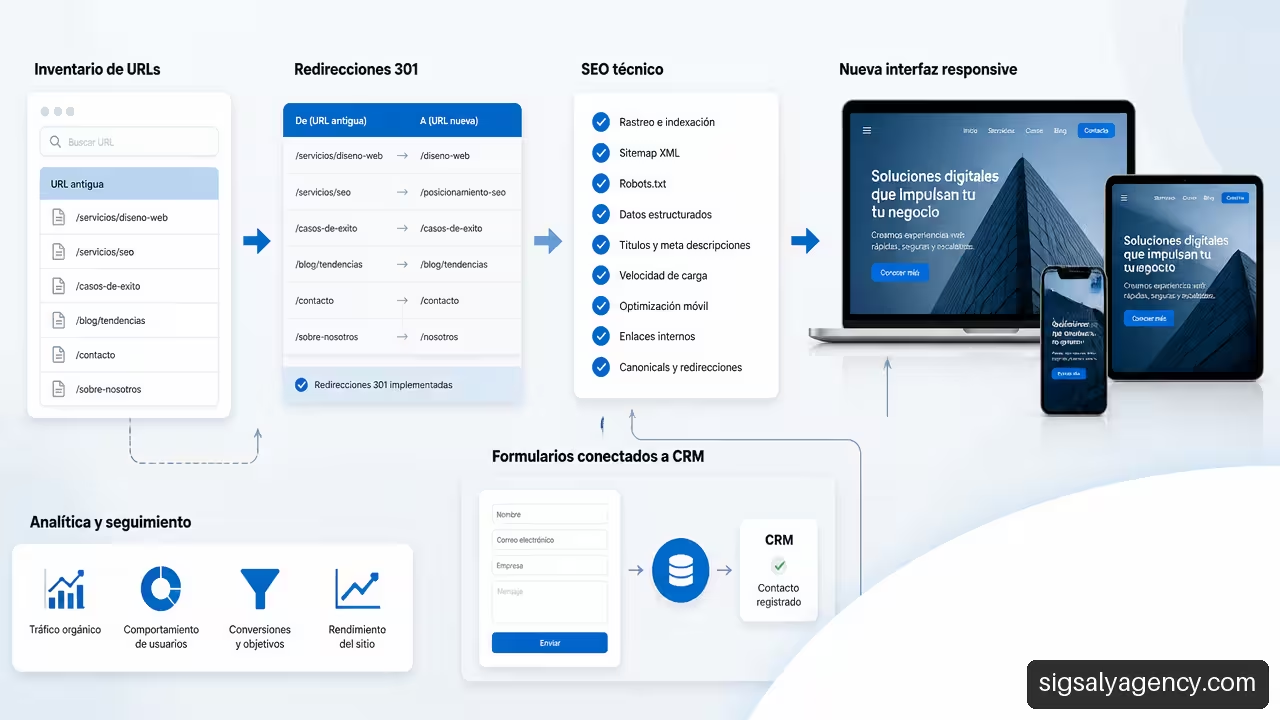
The biggest risk of a redesign is usually not the new design, but poorly controlled migration. Changing URLs, removing content, forgetting redirects or blocking crawling can reduce organic visibility even if the new website is better for users.
Preparation should follow this sequence:
- Create an inventory of current URLs, traffic, conversions, titles, metadata and internal links.
- Decide which pages are kept, merged, deleted or replaced.
- Prepare 301 redirects from each relevant URL to its most equivalent destination.
- Review canonicals, sitemap, robots, structured data, internal links and error pages.
- Test forms, analytics events, consent, CRM and conversions in a testing environment.
- Monitor indexation, errors, traffic and leads after launch.
A redirect does not fix a deletion without criteria. If a page that attracted traffic for a specific query moves to a generic page, the user may not find an answer and the search engine may interpret that relevance has decreased. That is why the content inventory is as important as the technical inventory.
The redesign is also an opportunity to review the approach of professional web design with SEO; especially if service pages, architecture and search intent are not aligned.
Plan Post-Launch Management
A corporate website does not end on the day of its publication. Without maintenance, updated content, security review and data analysis, deterioration reappears. The question is not just who will build the website, but who will be able to keep it useful six months later.
Governance should define those responsible for publishing, review criteria, permissions, approved components and protocol for urgent changes. If the business depends on campaigns, there must also be a clear way to create landing pages without breaking the design or losing analytical traceability.
At this point, it is worth understanding Website maintenance and its importance as a continuity practice, not as an isolated technical task. A maintainable platform reduces dependency, allows errors to be corrected early and makes the redesign retain value over time.
Key Points
• Redesigning a corporate website is necessary when problems affect business, usability, technology, content and measurement repeatedly or structurally.
• Visual appearance can be a signal, but it should not be the only reason to approve the project.
• A drop in conversions requires reviewing traffic quality, value proposition and the funnel before blaming design.
• If the problem is on specific pages or flows, incremental optimisation is often more prudent than redesigning the entire site.
• If architecture, CMS, integrations and mobile experience are all failing at once, a full redesign can reduce the cost of continuing to accumulate patches.
• Migration must protect URLs, content, redirects, analytics and integrations to avoid SEO loss and missed business opportunities.
Frequently Asked Questions
How Often Should You Redesign A Company Website?
There is no universal timeframe. An interval of two or three years can serve as a reminder to audit the website, but not as an automatic rule. I would decide based on business changes, results, technical state, mobile experience and maintenance capacity.
Does A Slow Website Justify A Redesign By Itself?
It depends on the cause. If slowness is due to unoptimised images, unnecessary scripts or a specific template, technical optimisation may be enough. If it comes from outdated architecture, an unmaintainable theme or a platform with no room for improvement, redesign can be the most sustainable solution.
How Do I Know If The Problem Is With The Website Or The Quality Of Traffic?
Compare behaviour by channel, campaign, device and landing page. If traffic from a specific source abandons much more than the rest, review segmentation and ad promise. If all channels get stuck on the same form or service page, friction is probably on the website.
When Is It Enough To Change The Design And When Do You Have To Change The Architecture?
Changing the design may be sufficient if the content, navigation and CMS continue to work. You need to rethink the architecture when users cannot find services, audiences have incompatible journeys, pages are duplicated or the current structure does not reflect how you sell today.
What Metrics Should I Review Before Deciding?
Review conversions per page and channel, form abandonment, landing pages, mobile interaction, perceived speed, technical errors, internal queries, content publication time and integration performance. No single metric offers a complete diagnosis.
How Does a Redesign Affect SEO?
It can improve it if you organise content, performance and experience, but it can also reduce visibility if relevant URLs are deleted, 301 redirects are missing or internal links change without control. Prior inventory and subsequent validation are mandatory to reduce that risk.
What Accessibility Problems Should I Detect?
Check colour contrast, heading hierarchy, alternative text, form labels, visible focus, keyboard navigation, error messages and touch control size. If defects appear in common components, it is better to fix the entire system.
Sources
• nakytec.com — https://nakytec.com/recursos/senales-redisenar-web-empresa/
• quois.com — https://www.quois.com/blog/como-saber-web-necesita-rediseno/
• studiocontra.co — https://www.studiocontra.co/es/ideas/rediseno-web-empresas-senales-proceso-costos